
Meer flexibiliteit. Meer automatisering. Meer omzet!
Met de Flow Builder definieert en automatiseert u zeer individuele bedrijfsprocessen op één plek — zonder één regel code te schrijven. Maak flows voor specifieke taken en laat zakelijke gebeurtenissen uw vooraf ingestelde acties activeren. Profiteer van snellere reactietijden, meer flexibiliteit en meer controle over uw bedrijfsvoering.
Boost your business potential
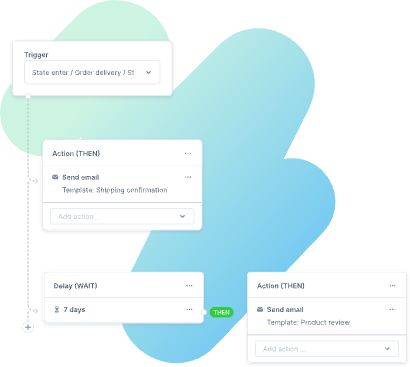
Ecommerce automation using Flow Builder empowers tailored responses to business triggers, whether they originate from Shopware or third-party apps.
Ideal for intricate business models, such as diverse or customizable product offerings, global customer segments, or streamlining workflows with staff and suppliers.
Shopware's Flow Builder allows you to shape your business model to your preferences, avoiding constraints and enabling scalable growth for ambitious ideas.
Altijd een stap voor
De toekomst van e-commerce-automatisering is hier! Bij Shopware lopen we altijd voorop in de ontwikkeling van de meest innovatieve functies waarmee je jouw bedrijf zo efficiënt en effectief mogelijk runt. En de Flow Builder vormt daarop uiteraard geen uitzondering!
Time-saving mastery
Achieve more in less time. Simplify even complex business procedures and modify workflows according to your wishes and unique requirements.
Endless possibilities
Explore new territory. Using the Flow Builder in combination with the Rule Builder offers infinite possibilities to automate business processes without writing code.
Customized and control
You're in control. Design your system infrastructure to suit your requirements. Create workflows that have multiple conditions, resulting in individual and variable actions.
Agile scalability
Whether B2C, B2B or D2C – the Flow Builder easily adapts to your current business model, and yet you always remain flexible to pivot and scale your business.
Wat zijn de technische vereisten?
De Flow Builder is inbegrepen in alle Shopware 6-abonnementen, maar webhooks zijn exclusief voor Shopware Evolve en Shopware Beyond. Deze webhooks zorgen voor naadloze integratie met systemen van derden en maken geavanceerde automatisering mogelijk.
Shopware Evolve en Beyond bieden de meest uitgebreide Flow Builder-opties zonder codering, voor maximale flexibiliteit en controle over uw bedrijfsvoering.
En we zijn nog niet klaar! We verbeteren de Flow Builder continu op basis van jouw feedback. Ons doel is om jouw leven eenvoudiger te maken en jouw zakelijk succes te vergroten. Shopware is gemaakt voor jou!


Hoe je de Flow Builder optimaal benut.
Dankzij het Open Commerce-platform van Shopware en onze wereldwijde ontwikkelaarscommunity beschik je over eindeloze mogelijkheden om de Flow Builder verder uit te breiden.

Tag-based categorization
Segment customers and orders into specific categories through tags.

Customized messaging
Create individual emails according to your tags and categories.

Document creation
Generate invoices, customer surveys and other documents.

API integration
Send data to API-based third-party systems with webhooks.

Order management
Set the order status. Customise order and payment procedures.

Custom delivery options
Offer custom delivery options to automate and streamline your shipping process.

Supplier interaction
Define workflows to simplify interactions with your suppliers.

Internal communication
Automate internal business communication.

Event-based notifications
Alert your staff automatically if a certain event has been triggered.

Flow Builder in actie
Bekijk hoe Matthias Friedmann, Product Owner bij Shopware, de Flow Builder presenteert tijdens de Shopware Community Day 2021.

Ontworpen voor diepgaande kennis van Flow Builder
Ontdek hoe u uw dagelijkse bedrijfsvoering optimaliseert met de Flow Builder.

Vragen?
Vraag uw persoonlijke adviesgesprek of Shopware-demo aan. Vertel ons wat u nodig heeft — wij regelen de rest.