
I had the chance to participate in the last Shopware Hacktober 2024 which was a great event in a full swing.
During this event, I finally found time to create a working draft of a pull request to have a configurable robots.txt file directly in Shopware. I originally created it as a Frosh-plugin, as a customer of ours needed this feature in the early days of Shopware 6. However, it was time to have this feature in the core of Shopware 6, and in this blog post I will also explain why.
And guess what? This pull request has been merged and released with 6.7.1.0, yeehaa!
Why is a robots.txt necessary
For any website, be it a shop or anything else, a robots.txt is absolutely mandatory if one wants to do SEO properly.
So far, you would have to rely on Shopware's noindex or nofollow tags in the X-Robots-Tag-HTTP-header or the robots-meta HTML tag. If the parameters have been set properly, these pages wouldn't be indexed by search machines. However, these "instructions" only control whether a page is indexed or if its links are followed after it has already been crawled.
Steer the crawl budget
BUT: Every website has a proper crawl budget set by the search engines. The bigger your stock of product items (including variants, AKA "SKU") is, the more pages your website contains and the more crawling activity you might recognize from search engine bots. And if you do not regulate it, these crawlers may only be following links which should not be index and not crawl/index your really important PDPs (product detail pages) if the crawling budget has been exhausted.
This is where a robots.txt comes in. It acts as an initial instruction to web crawlers, preventing them from even requesting or downloading disallowed content. This is why you should provide a robots.txt for your online store or any other website to prevent the search engine not to crawl all of your data.
In the combination with a sitemap, you offer your website structure to the search engine on a silver platter: Hence, you provide specific folders, sites and URLs and disallow others which you do not want to have indexed. In other words a robots.txt is about preventing crawling, while X-Robots-Tag is about preventing indexing once a page has been crawled. Please note that this is only a request to the search engine and cannot be claimed (SEO is certainly snake oil anyways, isn't it? ^^)
Show them the way to the sitemap
However, in my opinion, the even more important feature is the location of sitemaps, for Shops which have for example language "folder-like"-paths. Search engines will usually automatically search for sitemap.xml on the top level domain or sub domain path like https://yourshopwarestore.com/sitemap.xml. If the sitemap is placed anywhere else like in a "virtual"-folder, the search engine might not find it. This could be the case, if you, for example run two Shopware sales channels on one (sub)domain, like https://yourshopwarestore.com/en/ and https://yourshopwarestore.com/de/.
With this new Shopware feature, the robots.txt will automatically direct search engines to the correct locations of your sitemap.xml files, even in virtual paths. This ensures they will be found without the need to specify them manually, for example, in the Google Search Console.
Why this feature is built in the core instead of a plugin
There are basically two reasons for this: many people install Shopware without any knowledge of basic SEO and then complain that their "language"-website is not indexed by search engines or is indexed inadequately. Therefore, they first need to learn about the necessity or even existance of a robots.txt file, and find and/or manually install a suitable plugin. This new feature in Shopware makes it easier to get started with your own shop right away.
On the other hand, there's a technical issue that would need a modification of the RequestTransformer, if no sales channel would point to the root domain. This kind of change is much easier to implement within the Shopware core itself than in a plugin (although it probably would be technically possible).
Where to find and how to use it
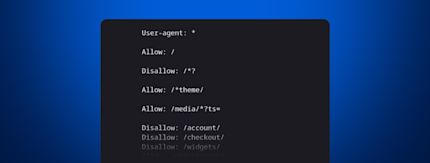
As this feature was built in to Shopware from v6.7.1.0 on, no extra installation is needed. You just install or update Shopware and will find an auto generated skeleton at https://yourshopwarestore.com/robots.txt looking like that (according to the sales channel with the virtual domain https://yourshopwarestore.com/en/):

Feeling fancy to adapt the parameters? No problem: go to your Shopware administration panel => Settings => Basic information to find a form setting up your specific parameters for your project's robots.txt.

Note that the domain path, for example /en/ will automatically prepended to the allow and disallow rules.
Have fun with this new feature and use it wise. You know: with great power comes great responsibility ;) Also, remember to avoid any contradicting directives between your sitemap and robots.txt file.
Help optimizing
If you are a developer, have more ideas and want to join our contributions to Shopware, please feel free to join us at https://github.com/shopware/shopware/graphs/contributors!
![]() |
Max Schlemmer is a developer and consultant with a passion for the Shopware ecosystem. He enjoys contributing to the Shopware Core and working on extensions for the Shopware Store. Additionally, he is interested in open source projects like Frosh. |