
Many B2B merchants and manufacturers already work with detailed CAD files in product development and production. What has been missing so far is a simple way to use this data in digital commerce. With CAD to 3D File Conversion – or CAD to 3D for short – Shopware lowers the barrier to adopting 3D and AR in ecommerce by removing the complexity, cost, and manual effort typically required to prepare web-ready 3D files. Existing CAD data can be reused directly, without new tools, manual configuration, or external service providers.
As part of our Feature Focus series, this article explains why CAD to 3D was built, which benefits it offers, and how you can use it in your Shopware store.
Why CAD to 3D was developed
In B2B commerce especially, products are often complex and require detailed explanations. Dimensions, proportions, and spatial context play a decisive role in purchase decisions.
At the same time, many merchants face the same challenge: Although CAD files already exist, they are not suitable for the web. They are typically too large, too detailed, or technically incompatible with browsers, 3D viewers, or augmented reality applications. Preparing these files for web use often requires specialized tools, manual effort, and additional costs – which frequently prevents merchants from using 3D in ecommerce at all.
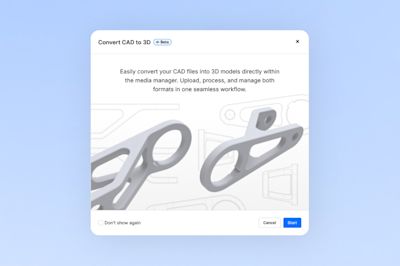
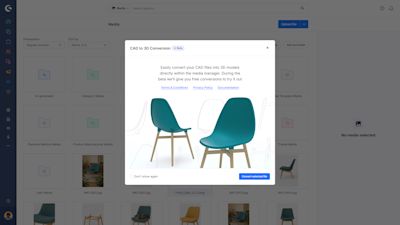
By popular demand, CAD to 3D File Conversion was developed to significantly lower this barrier and make 3D and AR adoption more accessible. The feature enables merchants to convert existing CAD files directly in Shopware into optimized .glb files that are ready for 3D and AR use in the storefront. What was once purely production data becomes a usable commerce asset.
What are the benefits of CAD to 3D?
CAD to 3D offers clear, practical advantages – especially for B2B merchants and manufacturers:
Lower costs and faster time to market No manual conversion workflows and no external 3D service providers required.
Foundation for 3D, AR, and immersive layouts Models can be used in 3D viewers, AR experiences, or immersive scroll animations.
Web-ready, performant 3D models The resulting .glb files are compressed and optimized for fast loading.
Reduced complexity for developers and partners Native integration eliminates the need to build and maintain a separate 3D pipeline.
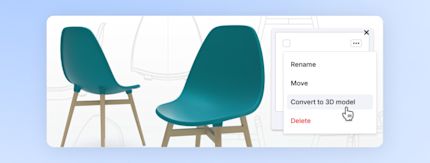
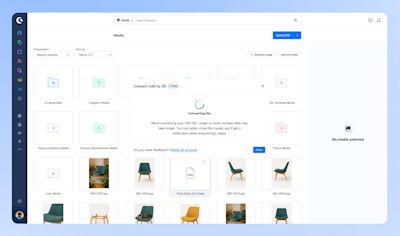
One-click conversion in Shopware Conversion happens directly in the Media Manager, without external tools or accounts.
Reuse existing CAD data Production files can be used directly, without creating new 3D models from scratch.
Increased customer engagement and sales potential Interactive 3D and AR experiences help shoppers better under
How to use CAD to 3D
Using CAD to 3D is fully integrated into the Shopware workflow:
Log in to your Shopware admin.
Open the Media Manager.
Upload a CAD file or select an existing one.
Click “Convert”.
Shopware automatically converts the file into an optimized .glb model.
The 3D model is then available as a media asset, for example in:
product detail pages with a 3D viewer
augmented reality views
immersive layouts and scroll animations
No manual configuration is required.
Technical context and requirements
CAD to 3D is provided as a Shopware Service and is available directly in the Shopware admin. Current requirements and parameters:
Supported file format: .step
Maximum file size: 500 MB
Converted models contain geometry only (no materials, textures, or lighting information)
This approach ensures stable, performant 3D models that are optimized for web use.
CAD to 3D – now available
CAD to 3D File Conversion is now available for eligible commercial plans (see Shopware plans and pricing). If you are using the Shopware Community Edition, you can benefit from CAD to 3D via Shopware Intelligence+.
Important note: unlocking spatial commerce with CAD to 3D
CAD to 3D is designed to turn production data into functional, performant 3D models that serve as a strong foundation for spatial commerce experiences. CAD files originate from engineering and focus on geometry rather than visual styling – making them ideal for fast, reliable 3D and AR use in ecommerce.
The converted .glb files provide a high-quality base that can be enhanced further. Additional layers such as materials, environments, or storytelling elements can be added directly in Shopware, for example by using the Scene Editor to create richer, more immersive product presentations.
This approach allows merchants to introduce 3D and spatial experiences efficiently using existing data, while retaining full flexibility to build more advanced visual experiences over time.
Who is CAD to 3D for?
CAD to 3D is useful for any merchants readily working with CAD files, and particularly relevant for B2B merchants and manufacturers who:
design or manufacture their own products,
sell complex or technical products,
rely on spatial understanding for purchase decisions.
Developers and implementation partners also benefit, as 3D assets can be used directly within the Shopware ecosystem without additional integrations.
What’s next?
CAD to 3D is a core building block of Shopware’s Spatial Commerce approach. The goal is to make 3D and immersive product experiences more accessible and seamlessly connected with existing Shopware features.
Conclusion: accelerating your path to spatial commerce
With CAD to 3D, you can accelerate your path to spatial commerce. By reusing existing production data, you can explain complex products more clearly, reduce manual effort and costs, and introduce 3D experiences in your online store faster.
The result is a better foundation for confident purchase decisions and more engaging product experiences – directly in ecommerce.
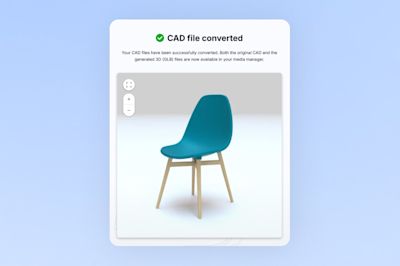
Try CAD to 3D File Conversion and see how your existing CAD files can become interactive 3D experiences – directly in Shopware.