




1. Introduction to Shopware Caching
1.1 Why Caching?
In the world of ecommerce, every millisecond counts. When we discuss caching here, we aren't referring to object caching (such as Redis storing computation results). We are talking about the HTTP Cache.
This is the layer that saves the fully rendered HTML page or API response. When a user requests a cached product page, Shopware doesn't have to boot up the entire application kernel, query the database, or render Twig templates. It just serves the saved file. It is the difference between a 500ms response and a 50ms response. Additionally, the HTTP Cache can serve a way higher number of current requests, without needing to scale up the application resources behind the cache.
1.2 How does it work currently?
Currently, Shopware attempts to cache as much as possible; however, we encounter a major bottleneck: Cache Permutations.
Imagine a product page. It might look different depending on:
Language (English, German)
Currency (EUR, USD)
Tax States (Net or gross?)
Active Rule Builder Rules (Is it Sunday? Is the customer in a specific group?)
Currently, Shopware generates a unique cache entry for every combination of these rules. If you have 50 rules defined in your Rule Builder, the system technically has to account for 1125899906842624 (that is over a quadrillion or over a million billion in words) possible combinations.
The Pain Points:
Low Hit Rate: Because the cache key is so specific (hashed based on all rules), users rarely share the same cache entry.
Uncached States: By default, once a customer logs in or adds something to the cart, Shopware disables the HTTP cache entirely for that user.
Store API: The API powering headless frontends is largely uncached.
2. What Changes - The Big Picture
We are introducing a comprehensive overhaul to address these issues. Here is the high-level view:
2.1 Efficiency
We are drastically reducing the amount of cache permutations. Instead of hashing every rule into the cache key, we now only include rules that are actually relevant to the page being viewed (e.g., specific shipping or payment rules). This results in higher hit rates and significantly smaller cache storage requirements.
2.2 Store API Caching
We are opening the doors for caching the Store API. This is huge for Frontends and headless setups. We’ve added support for caching POST requests (common in searching) by converting them to GET requests with a compressed criteria parameter.
2.3 Caching for Logged-in Users
Previously, the requests of a logged-in user bypassed the HTTP cache. We have inverted the defaults: Now, logged-in states and filled carts are cached by default.
2.4 Better Configurability
We are providing you with fine-grained control over cache headers (Cache-Control, s-maxage, etc.) through a new, flexible policy system.
3. Timeline
This is a major change, so we are rolling it out gradually.
Feature Flag: The changes are hidden behind the
CACHE_REWORKfeature flag.Availability:
Permutation optimization (under feature flag name
CACHE_CONTEXT_HASH_RULES_OPTIMIZATION) is available in 6.7.3.x and 6.7.4.x. - thanks to Max for the contribution!Feature Flag
CACHE_REWORKis available starting with 6.7.5.0.The full rework is targeted for 6.7.6.0 (currently expected in January 2026).
Breaking Changes: Yes, this will be a breaking change for some extensions. Therefore, the feature flag will only be removed with the next major version 6.8, and the new behaviour will only become the default with that version.
4. The Breakdown
Let’s dive deep into the technical details.
4.1 What will break?
If you have an extension that modifies the storefront for logged-in users (e.g., displaying a "Hello, [User]" banner dynamically via PHP), it may now be cached and show "Hello, [User]" to all users. You will need to adapt your extension to either use JavaScript for dynamic content or explicitly opt out of caching for that specific route.
All breaks are explained in detail in the upcoming sections.
4.2 Store API will be cached
4.2.1 Do I need to change anything in my API clients?
It depends. To safely and effectively cache the Store API, clients (your frontend) must send the current cache hash of the “session” with every request. Not doing that will lead to decreased efficiency.
The cache hash is returned as both a header and a cookie in the response, labeled as "sw-cache-hash". The cookie is in place to facilitate client implementations. When the client automatically sends the cookie back with every subsequent request (as browsers typically do), the cache will be utilized correctly, and you don’t have to change your client. If handling headers is easier in your client's implementation, you can also ensure that you send the value back as the sw-cache-hash header. Note: When the cache hash is present in both the header and the cookie, the header value takes precedence.
4.2.2 POST vs. GET
Most Store API endpoints use POST (e.g., product search) because the Criteria object (filters, sorting) is too large to be included in a URL query string. However, standard HTTP caches only cache GET requests.
The Solution: You can now pass the criteria as a compressed, encoded string in a GET request using the ?_criteria parameter.
Format: base64url(gzip(json_encode(criteria))).
When you use the official Shopware js api client, it will automatically use the GET endpoints if possible to ensure your client will benefit from the enabled caching.
4.3 Cache active for logged-in shoppers
4.3.1 The Opt-out Mechanism
Previously, caching was disabled by default (“opt-in”) when you were logged in or had items in your cart. Now it is "Opt-out".
If your controller action must be dynamic, you need to tell Shopware to bypass the cache.
Before:

Note: You could “opt-in” by setting the array to an empty one: [].
Starting with 6.8:
The cache will be active by default for both logged-in users and when the cart is filled. To disable that, you need to create a Listener on the HttpCacheCookieEvent.
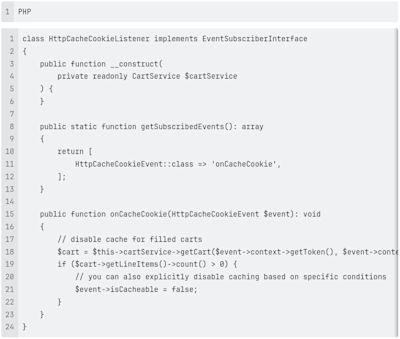
This is intended for cases where your storefront is so dynamic that, as soon as the cart is filled, it becomes impossible to cache the content efficiently, and it is preferable to disable caching altogether. The most performant approach would be to keep the base responses cached by default, to keep the shop fast and snappy. Then, asynchronously load the dynamic content using JavaScript on the client side and insert it into the cached static page.
4.4 Cache control headers are now configurable
We finally have a standardized way to define Cache-Control headers. You no longer need to fight with hardcoded values.
4.4.1 How?
You can define Policies in your shopware.yaml. A policy allows you to set the following directives: public, private, no_cache, no_store, no_transform, must_revalidate, proxy_revalidate, immutable, max_age, s_maxage, stale_while_revalidate, stale_if_error. A detailed explanation of each directive's function can be found here.
4.4.2 What can I configure?
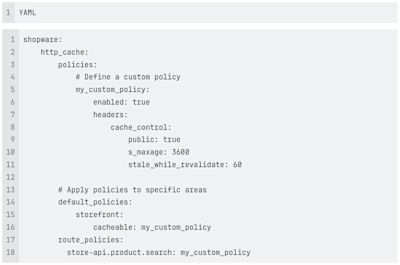
You define your own policy to be used as the default for cacheable and non-cacheable storefront and store API responses, as well as to override a specific cache policy at the route level.
4.4.3 Why configure this?
This provides better compatibility with Reverse Proxies (such as Varnish or Fastly). You can instruct the proxy to retain content for a longer period (s_maxage) while browser caches expire sooner. The benefit of the reverse proxy cache is that the data stored there can be invalidated if the source data changes; therefore, longer periods are possible, while you want to keep caching on the client side shorter-lived. You should customize this configuration in cases where you know that you can generally extend caching periods (e.g., because you only update product data on a daily or weekly basis and are confident it won’t change in the meantime). Additionally, it may be the case that you want to cache some pages more aggressively, for example, landing pages for specific marketing campaigns that receive a high volume of traffic.
4.5 Cache will be smaller & more efficient
4.5.1 How is this achieved?
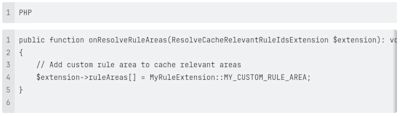
We introduced a new extension point: ResolveCacheRelevantRuleIdsExtension.
Previously, if you had a "Sunday Sale" rule active, it changed the cache hash for every page, including the "Contact Us" page, which has no relation to products.
Now, we limit the cache hash to only include rules relevant to the current page area (e.g., only Product rules for Product pages).
Code Insight:
4.5.2 The Result
Smaller Cache: Fewer variations of the same page are stored in the HTTP-Cache.
Higher Hit Rate: Users are more likely to hit an existing cache entry because irrelevant rules don't change the hash.
4.6 Better Reverse Proxy Compatibility
We have refined our communication with Varnish/Fastly, which should ultimately lead to broader support for other reverse proxy caches as well.
We now support standard Cache-Control and Vary headers.
We removed the custom hashing logic that made external caching difficult.
We provide a simplified Varnish configuration that relies on standard cookie parsing.
5. What next?
5.1 Use the Feature Flag
You can start testing these changes today by enabling the CACHE_REWORK feature flag in your .env file if you are on the latest trunk or on 6.7.5.0 or later.
5.2 Prepare early as an extension developer
If you maintain plugins:
Audit your code: Do you use rules in a way that is relevant for the HTTP cache? Ensure that you add the relevant rule areas to the cache, as described above.
Check dynamic content: If you show user-specific data (names, loyalty points) in the HTML, verify if it still works when cached. You might need to move to AJAX loading.
Note that all these changes are backward compatible; you can update your plugins, and they should remain compatible with both the new and old caching behaviors simultaneously, without the need to maintain separate code for each case.
If you build a headless storefront:
Send along the correct hash cookies: Ensure that you send the sw-cache-hash cookie with the requests to the store API, so that the correctly cached data is served.
5.3 For Agencies and Merchants
This update is a massive performance win. It prepares Shopware for much higher traffic loads by offloading more work to the cache layer. Instead of waiting for this to land in the upcoming major version 6.8, you can already opt in by enabling the feature flag to benefit from the improvements outlined here. This will also make it easier for you to upgrade to 6.8 more smoothly in the future. Keep in mind that you should audit your extensions, as described in this post, to ensure they are compatible with those changes.
Happy Caching!