
Contact us
 Download logo as SVGDownload logo as PNG
 Copy logo as SVG
 Visit brand guidelines
Where sales teams perform at their best. Digital Sales Rooms help advanced B2B and B2C organizations deliver personalized buying experiences and close deals faster by bringing every sales interaction into one connected workspace.
Digital Sales Rooms provide a shared platform for sales teams and buyers to connect, explore products, request quotes, negotiate pricing, and place orders. Whether live together or independently, every interaction happens in one secure, fully synced environment with real-time access to product data, pricing, and stock availability.
In this video, you’ll see how the solution streamlines every interaction and delivers a new level of connection, clarity, and efficiency across your sales process.
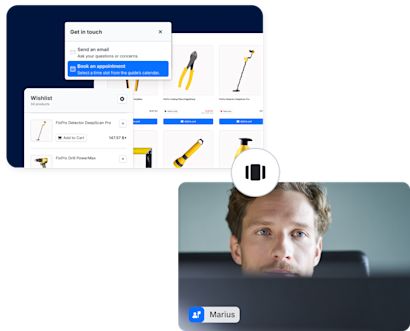
Guided sessions unite sales teams and customers in a video conference that feels as natural as an in-person meeting. Whether it’s a one-to-one consultation or a large-scale product launch, every session is fully interactive. Sales reps can see what customers explore in real time, from the products they view and add to their cart to the items they shortlist for discussion.
Together, both sides can review product details and co-create tailored offers. Discounts and quote requests are managed directly within the session. When the meeting ends, the presentation automatically transforms into a self-guided session, allowing customers to review and complete their order at their own pace.
Self-guided sessions are personalized microsites that allow customers to explore product presentations on their own. Self-guided mode combines real-time data and integrated checkout to create a flawless, self-directed buying experience. Customers can request quotes, communicate with sales, or book follow-up meetings. They can also create shopping lists, add products from the main store, and revisit the session at any time to continue the journey or finalize a purchase.

Some of the key areas where Shopware focuses include:
B2C & B2B commerce capabilities
Open-source foundation with enterprise-grade security
Headless, API-first architecture
Innovations in AI and spatial commerce
A global ecosystem with a strong partner network Flexible pricing models
Digital Sales Rooms are included in Shopware Beyond and natively embedded within the Shopware platform, making setup fast and effortless. With the recommended integrations for video conferencing and real-time communication, DSR can be fully operational within days – bringing transparency, collaboration, and intelligence to every stage of the sales journey.
The solution consists of two components: an extension in Shopware 6 and a standalone app that powers the Digital Sales Rooms frontend. Once installed, the app runs independently for maximum flexibility and scalability, accessible via a dedicated domain. With the recommended integration for video conferencing and for real-time communication, Digital Sales Rooms can be fully operational within days – bringing transparency, collaboration, and intelligence to every stage of the sales journey.
DSR is separate from the storefront. Its frontend runs on its own domain, which merchants can link to an existing sales channel or dedicate a separate sales channel to. This ensures that both merchants and customers access DSR through a distinct, purpose-built domain.
Shopware 6 Digital Sales Rooms require a Shopware 6 installation. The DSR plugin can be installed via Composer; after installation, the admin interface is added automatically. The plugin provides the frontend template and source code needed to run DSR.
DSR frontend setup The DSR frontend must be set up separately (detailed instructions are provided in the documentation). It runs on its own domain, which merchants can link to an existing sales channel or configure as a dedicated DSR sales channel.
Daily.co (video conferencing) A Daily.co account is required for video conferencing. Daily integrates with DSR via API keys and powers guided, real-time sessions between sales teams and customers.
Mercure Hub (real-time communication) A Mercure Hub account is required to enable real-time updates and simultaneous interactions in DSR. Mercure connects to DSR through APIs, ensuring synchronized views for customers and sellers.
Presentations Digital Sales Rooms use Shopware’s page builder (Shopping Experiences) to create presentations. Merchants can build landing pages, category pages, and product detail pages, or work with partners to develop custom templates. In the DSR configuration menu, merchants define which templates should be used by default when creating new presentation pages.
Products DSR is fully connected to Shopware’s product database, ensuring that all product data (prices, stock levels, and other relevant information) is always up-to-date. Because DSR does not connect directly to the ERP, products must first be imported into the Shopware product database before they can be used in DSR. DSR can only display products assigned to the sales channel it is linked to.
Rule Builder DSR leverages Shopware’s Rule Builder for: - Customer-specific pricing - Discounts and price adjustments This ensures personalized and flexible pricing during both guided and self-guided sessions.
Customer database DSR integrates directly with the Shopware customer database. Sales teams can invite customers to guided sessions or share self-guided presentations with a few clicks. During a guided session, sellers also see relevant customer information such as recent orders and sales history.
Direct checkout connection Customers can purchase products directly during or after a guided session, as well as through self-guided presentations. The checkout process is purpose-built for Digital Sales Rooms and differs from the standard storefront checkout. Any custom checkout plugins must be made compatible with the DSR checkout.
Yes, existing storefront extensions can be used in Digital Sales Rooms, as long as they are compatible with Shopware Frontends.
Products cannot be pushed directly from the ERP into DSR. They must be imported into the Shopware product database first, as DSR only displays products assigned to the connected sales channel.
Yes, DSR is available for Shopware SaaS in the Beyond plan.
Commerce is shifting fast, and your sales team can lead the way. Want to explore what Digital Sales Rooms can do for your business?