


Shopware 6.7.7.0 introduces, among other things, an improved Google Analytics 4 integration, new possibilities for 3D, and an updated cookie consent experience.
You’ll find all the details in the sections below.
Overview:

Improved Google Analytics 4 integration
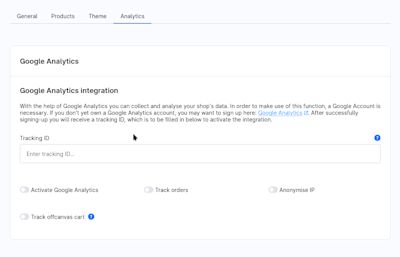
With Shopware 6.7.7.0, the Google Analytics 4 integration has been specifically enhanced to provide a more accurate and comprehensive view of user behavior in your shop.
E-commerce events such as add_to_cart, begin_checkout, or purchase now include additional information like currency, cart value, brand details, and a hierarchical product category structure. At the same time, new events have been introduced, including actions for wishlists, cart views, as well as shipping and payment information.
The checkout funnel is now tracked in greater detail: changes to shipping or payment methods are taken into account, and events are triggered more reliably – for example when navigating product listings or applying filters.
In addition, new configuration options provide more control over the behavior and tracking of the off-canvas cart: merchants can now decide whether the off-canvas cart should open automatically after a product is added. This allows for more deliberate user flows and more accurate checkout funnel tracking.
Your benefits as a merchant: better data quality in GA4, greater transparency throughout the entire purchase journey, and a more solid foundation for marketing, conversion, and funnel analysis.
Cookie consent: now multilingual, more user-friendly, and more accessible
With this release, the cookie consent functionality has been improved on multiple levels:
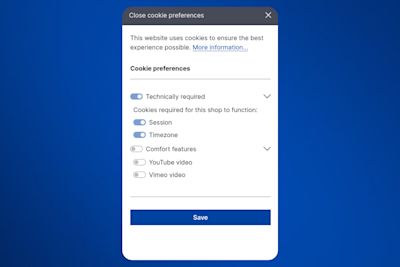
Multilingual support: Cookie consent is now stored per language. This means that if users accept cookies in a specific language and later return to that language, the cookie banner will not be shown again. The consent decision remains consistent and transparent – even when switching languages.
Usability and accessibility: The cookie consent dialog has also been visually and technically refined. Checkboxes have been replaced with toggle switches, and improved ARIA attributes make the dialog more accessible and easier to use with screen readers.
Your benefits: fewer repeated cookie prompts for users, a clearer and more modern consent experience, and improved accessibility – especially important for international shops and compliant, user-friendly storefronts.
View 3D models directly in the administration
From now on, 3D models can be viewed directly in the Media module of the administration. When you select a 3D file, an interactive viewer appears in the preview sidebar, allowing you to rotate, zoom, and inspect the model from different angles. This makes it easier and faster to review and manage 3D content.
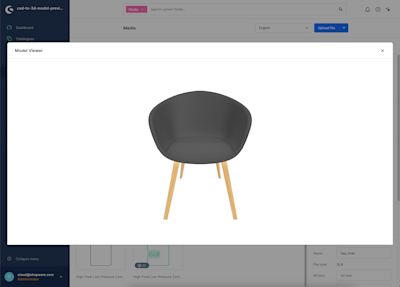
In addition to the preview, a larger view of the model is also available in the Model Viewer.

Shopware 6.7.7.0 also includes several technical improvements for developers:
Symfony upgrade to 7.4, including updated dependency requirements.
Improved performance across core systems, especially for complex DAL queries and large catalogs.
Smarter caching with tag-based invalidation, better HTTP cache control, and improved cache logging.
Custom fields search optimization, now disabled by default to reduce index size and improve performance.
Clearer product classification with the new
product.type, replacing the deprecatedproduct.states.
For a complete overview of all technical changes and details, check out the Changelog.

This section is about features that are not included in the Community Edition. Take a look at our overview to compare the different Shopware plans and activate the Shopware Commercial extension to use the commercial features.
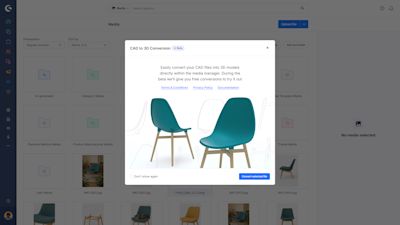
CAD to 3D – beta coming soon
Unlock spatial commerce by converting your existing CAD files into fast-loading, web-ready .glb models with just one click. Built natively into Shopware, you can use your converted models as product media, or explore 3D displays, AR viewers, immersive layouts, and scroll animations.
What used to be a production file is now a flexible storytelling asset, without new tools, workflows, or specialists.
The CAD to 3D converter will roll out as a free beta in the coming days. You’ll find more details in the documentation and our feature focus blog post.
Shopware Services: Regular status checks for active shops
As shop functionality becomes increasingly distributed through Shopware Services, systems need a reliable way to determine which shops are active and what their current status is.
To support this, Shopware has started to periodically ping shops that have Shopware Services enabled. This applies to all installations running version 6.7.1 or higher that actively use Shopware Services.
Over time, service and app systems naturally accumulate test, staging, development, or no longer active shop instances. The regular ping helps identify such installations more clearly and ensures they can be managed and cleaned up more effectively.
Benefits for shop admins, partners, and hosters:
Better transparency into which shop instances are active or inactive
Cleaner and more maintainable service and app databases
More reliable communication between shops and connected service

We wish you lots of fun and success with the latest version of Shopware.

We extend our heartfelt thanks to all GitHub contributors for their pull requests that have been incorporated into this version. 💙