One day of building & discussing together
There's a version of a developer event that's all keynotes and carefully rehearsed demos, where the schedule is the point, and the conversations happen in the breaks if you're lucky. Boost Day is not that event.
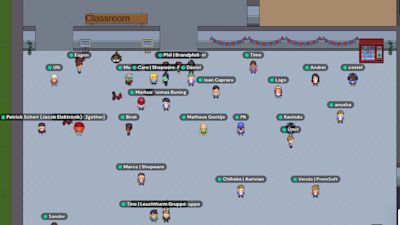
It's a day where the Shopware community, developers, agency partners, and Shopware team members show up in our virtual Shopware Campus with no obligation to impress anyone. The format is loose by design. There are sessions, yes, but there's also just time: to work through something that's been sitting on your list, to drop into a room mid-conversation, to ask a question you wouldn't ask in a public forum, and have that personal connection when someone explains.
That's the mood Boost Day runs on. And this edition, the first of 2026, had a lot of it.
Somewhere between a hackathon and a working session
The morning started with a hack-a-long, and the name is worth taking literally. It was less a hackathon and more a working session with good company. The open issues tagged BoostDay26 were there as a loose shared backlog, somewhere to point newcomers and something to organise around. But the real value of those first hours was in the conversations that the issues prompted.
Different rooms, different energy. In some, senior contributors were deep in debate about platform direction, the kind of exchange that usually requires a conference hallway and a coffee. In others, someone was setting up their local environment for the first time with a Shopware team member nearby, and the pace was slower and more deliberate. Neither was more valuable than the other. The point was that both were happening at the same time, in the same space, and anyone could wander between them.
Key takeaways
Who takes ownership of this code?
The first afternoon session was listed as a discussion about code quality with coding agents. However, it turned into something more interesting. Someone brought up junior developers, and the energy shifted.
The traditional path of most senior developers was to struggle with the code, break things, and figure it out. Today, more and more LLM agents are doing the work, while junior developers simply deliver the results. Everyone in the session was quick to agree that nothing compares to what the struggle of coding was teaching you.
This is connected to a point that is more relevant than ever: source code was never designed for machines. Machines get binary. Source code exists so humans can read it, reason about it, and take responsibility for it. Which means as long as source code exists, humans need to be genuinely capable of evaluating what agents produce. Not rubber-stamping it, but actually judging it.
One term emerged from the discussion that captures this well: LOCR — Lines of Code Responsibility. Everyone knows LOC. LOCR asks a different question. Of all the code in this codebase, how much does a developer actually own? Not written, not reviewed in a thirty-second scan, but genuinely understands and would stand behind. The gap between LOC and LOCR is, arguably, where most of the risk accumulates.
As one of the participants, Dean, put it plainly after the event:
"AI can be a huge help when building software, but engineers should always remain responsible for the code and its quality. We can't blame AI if an issue gets pushed to production. At the end of the day, we're the ones accountable, especially when bugs can lead to lost sales on high-traffic sites where the impact could mean thousands or even millions in revenue loss."
When using LLMs, another notable strategy mentioned was to generate the initial implementation, then ask the AI to review its own work or open a separate session for the review to get a fresher, more objective perspective.
Debugging: isolate before you investigate
Matheus Gontijo's session had a core argument that sounds obvious until you realise how rarely people follow it: most debugging goes wrong because people start too deep, too fast.
Before touching anything else, spin up a vanilla Shopware install with no plugins and no customisations. Reproduce the problem there. If it disappears, it lives somewhere in your stack. If it doesn't, it's core. That single step eliminates entire categories of confusion before they start.
From there, centralise your logs across web server, PHP, PHP-FPM, MySQL, and console workers. Use the network tab to copy requests as cURL and replay them cleanly. Keep Xdebug disabled by default in php.ini and tune xdebug.connect_timeout_ms is down from 200 to around 10, enabling it only when you actually need to step through execution.
Some of the most useful moments were the less polished ones, such as tricks that don't make documentation because they feel too crude to write down. Writing conditional breakpoints directly into PHP code. Running print_r(get_included_files()); exit; to see exactly which files are loading, which surfaces plugin conflicts you'd otherwise chase for hours. Using mysqldump with diff to see precisely what changed between two database states. Resetting MySQL data via rsync instead of a full import is faster when returning to a known state.
The shopware/dev-tools package and the Symfony web profiler also got proper attention for request-level visibility. The through-line across the whole session: build a repeatable process, work from the outside in, and don't guess when you can verify.
Have a look at Matheus full presentation here:
PayPal Sandbox: remove the risk from payment testing
If there's one session from Boost Day that most developers could apply directly to their work this week, it's probably Stefan Martens's walkthrough of the PayPal Sandbox.
Testing payment flows without a properly configured sandbox means working against real credentials, using your own credit card, and real charges. Plenty of developers have dealt with this.
The PayPal Sandbox removes all of that. A complete replica of the PayPal environment with fake money, fake accounts, and no consequences for mistakes. Setup starts at developer.paypal.com. The Sandbox Accounts section generates test buyer and merchant accounts automatically; no manual creation is needed. Create a Sandbox app for a Client ID and Secret, connect via Shopware's PayPal plugin with those test credentials, and you're running real end-to-end checkout flows against a safe environment.
The webhook simulator is where things get particularly useful. Instead of needing to trigger real transactions to test how Shopware responds to PayPal events (authorization, capture, cancellation, refunds, disputes) you can fire those events manually. Testing that your order states update correctly doesn't require a checkout. It requires the right webhook handler, and you can verify it works before anything touches production. Additionally, not testing webhook handling at all leads to order states not updating until production issues surface.
None of this is technically complicated once you've seen it done. That's exactly the point. The friction isn't in the technology, it's in knowing the sequence and where the gotchas are. 30 minutes with Stefan removes most of it.
Shopware CLI – one binary to rule them all
Niklas closed the day with a session about Shopware CLI. Most Shopware development environments involve a collection of custom scripts that live in the project and nowhere else. Manual Docker setups that someone configured once and nobody fully remembers. Account management workflows that happen in the browser. CI/CD snippets that get copied and pasted between teams and slowly diverge. They add up to a significant cognitive overhead that follows developers through every project.
Shopware CLI is the single local tool that replaces all of it. Install it once, and a wizard walks you through creating a new Shopware 6 project and spins the whole thing up. The project commands cover the full lifecycle from there: building the admin and storefront, running workers, managing cache, running the doctor to check for problems, formatting, validating, and more. A first taste is already available - shopware-cli project create now gives you an interactive project setup on local.
Multi-environment support and one config file that defines local, staging, and production, switchable with a flag. A console command proxy so you can run shopware-cli project console cache:clear against any environment without SSH. Database sync with anonymisation, so moving sanitised production data to local stops being a manual operation, deeper Shopware Account integration and full import/export of entire shops. And on the roadmap: AI agent and MCP compatibility, built in from the start, a natural next step for a tool that already aims to remove every manual step from a developer's day.
What Boost Day was really about
Looking back on Boost Day, there's a thread running through all of it. Good development practice isn't primarily about shipping faster. It's about building confidence in the code you're writing, the tools you're using, and in your ability to understand what's going wrong when something breaks. Every session was, in its own way, about that.
It puts people who care about these topics in the same space and lets the conversations happen. Those conversations don't stop when the Gather Town session closes. The open issues tagged BoostDay26 are still there. Go look at them. Leave your thoughts. That's where the next Boost Day starts.
If Boost Day left you wanting more, the Pre-SCD Community Hackathon is happening in Cologne on June 8th & 9th. Think the same energy, but in person.