


Many online stores reach internal limits during ongoing operations. Typical triggers include missing features, performance issues, rising maintenance costs, or an outdated system foundation that is no longer reliably developed. As a merchant, the question then becomes how to plan a successful ecommerce platform migration – including your entire data set and ongoing revenue – without disrupting your business.
Switching ecommerce platform: Key takeaways
Switching your ecommerce platform makes sense when your current system reaches its limits, becomes too expensive to operate, or lacks essential functionality.
The best time to switch is outside your peak periods, ideally with a six-to-eight-week buffer.
Start by choosing the right system type (SaaS, PaaS, or self-hosted).
Clearly define your requirements for features, integrations, internationalization, and marketing processes.
Fully test the new store in a staging environment: products, checkout, payment methods, shipping, customer data, and integrations.
Downtime can be minimized by fully preparing the new store and switching during a controlled cutover window.
Shopware supports ecommerce platform migration with a dedicated Migration Assistant, documented migration paths, and a strong partner network.
Pre-checklist: Should I switch my ecommerce platform?
My store is slow or occasionally unstable, especially under high traffic.
Updates regularly cause issues or are avoided due to risk concerns.
Important features (for example, B2B or internationalization) are missing or difficult to implement.
New requirements can only be implemented with significant effort.
Maintenance and agency costs are increasing without added value.
Planned growth or digitalization goals cannot be realized in the current system.
Additional indicators that switching is the right decision include outdated and sluggish software, unreliable integrations with ERP, PIM, or CRM systems, and the overall desire for a future-proof ecommerce platform.
Ecommerce platform migration guide
Your platform migration succeeds when you first select the new system, define your requirements, document your current state, determine the migration strategy, and thoroughly test the new store before going live.
Step 1: Choose the right system type
By selecting the system type, you set the course for how adaptable, maintainable, and feature-rich your solution can be in the future.
System type | Description | Advantages | Disadvantages |
|---|---|---|---|
SaaS (Software-as-a-Service) e.g. Shopware SaaS | Fully managed cloud operation. Updates, security, and infrastructure are handled by the provider. | Very low maintenance effort; fast implementation; stable and scalable; no server administration costs | Limited deep customization; dependent on provider’s feature scope |
PaaS / Cloud-native e.g. Shopware PaaS | Cloud hosting with greater control over architecture and custom code. | Broad flexibility; API-first; headless options; ideal for complex integrations and highly individual requirements | Requires technical expertise or agency support; higher development/DevOps costs |
Self-hosted / Open source | Operated on your own infrastructure or with a hosting partner. | Maximum customization; full control over code and server; independent of SaaS limitations; popular for complex B2B setups | Higher operational and maintenance effort; updates and security are your responsibility |
Step 2: Assess your current state (as-is analysis)
You assess your current setup by gaining a clear overview of your key store areas: products, customers, orders, content, existing integrations, and any custom functionalities.
Area | What to document | Why it matters |
Products | Quantity, variants, images, attributes | Foundation for data migration |
Customer data | Accounts, groups, opt-ins | Controls pricing, permissions, GDPR compliance |
Orders | Time period and volume of order history | Essential for customer service and reporting |
Content | Pages, landing pages, media | Important for SEO, marketing, and navigation |
Integrations | ERP, PIM, CRM, payment, shipping | Ensures business processes continue to function |
Custom features | Pricing logic, exports, automations | Identifies individual customization needs |
Step 3: Define your requirements (target state)
To ensure that switching to a new ecommerce platform is planned effectively, you need to clearly define your business and technical requirements. The more specifically you can articulate them, the easier it will be to select the right platform later on. Clear documentation at this stage simplifies your ecommerce replatforming process.
Business models: The new system must support your real sales scenarios, such as B2C with variant logic, B2B with customer-specific pricing and approval workflows, or D2C with recurring orders.
Planned growth: If you plan to expand into additional countries, languages, or currencies, you need multilingual capabilities, country-specific tax and shipping rules, and scalable pricing and catalog logic.
Marketing and content requirements: If your team frequently publishes campaigns, landing pages, or product stories, the system should include a CMS usable without developers, support multiple media formats (images, videos, 3D), allow layout adjustments without code changes, and provide reusable modules and templates.
Stable integrations with ERP, PIM, CRM, POS, or marketplaces.
Reliable performance and scalability during peak traffic.
Step 4: Define your migration strategy
You define your migration strategy by deciding how the technical transition will be executed, which data will be transferred, and how to organize the move in a way that ensures your ongoing operations remain unaffected. This stage of ecommerce replatforming determines how smoothly your platform migration will run.
Option 1: One-step migration
The store is completely rebuilt and then populated with all relevant data in a single import.
Suitable when:
The existing stories small or outdated.
Few custom functions must be migrated.
A short transition phase is acceptable.
Advantage: Fast completion
Disadvantage: Less testing time
Option 2: Migration with staging and multiple data imports
The new store runs as a staging version. Data is imported multiple times for testing and adjustments.
Suitable when:
Many integrations exist.
Custom functionality must be considered.
SEO, tracking, or B2B processes require careful transfer.
Advantage: Lower risk
Disadvantage: Longer project timeline
Option 3: Parallel operation with delta migration
An initial full import is completed. Shortly before go-live, a second import ("delta") updates new orders, customers, and changes.
Suitable when:
The store must remain accessible throughout migration.
Large data volumes exist.
Daily orders or B2B quotes cannot be lost.
Advantage: Very secure transition
Disadvantage: Higher technical complexity
Step 5: Testing before go-live
You test the new store before it goes live by reviewing all essential functions in a secure staging environment: products, checkout, payments, shipping, customer data, integrations, and content. The goal is to ensure that the new store runs smoothly under realistic conditions before it is launched online.
Requirements for testing
Independent staging environment
Realistic data set including products, customers, and orders
Access to all integrated systems (ERP, PIM, CRM, payment, shipping)
What to test
Products: Correct display? Variants, pricing, availability, tier pricing working?
Checkout: Seamless process? All payment methods functional? Shipping methods, delivery times, and costs accurate?
Customer data: Can existing customers log in? Registration and password reset working?
Integrations: Are orders correctly transferred to ERP? Is inventory synced? Do newsletter, tracking, and feed exports function?
Content: Are homepage, categories, and landing pages complete? Media and internal links working?
Final approval by the team:
Departments (customer service, marketing, logistics) review their areas.
Issues and missing content are collected and prioritized.
All open items are resolved before go-live.
Step 6: Protect SEO rankings and secure data
To preserve SEO rankings during migration, redirect your existing URLs correctly, transfer essential content completely, and submit the new store properly to search engines. In addition, you ensure that product, customer, and order data are complete and accurate after the migration. A well-planned ecommerce platform migration protects both rankings and customer data.
Set up 301 redirects for every old URL.
Transfer titles, descriptions, media, structured data, and internal links.
Update Google Search Console: submit new XML sitemap, check for crawl errors.
Test performance and Core Web Vitals via Google PageSpeed Insights.
Data security:
Before migration: Back up all products, customers, orders, and media.
After migration: Conduct spot checks to verify data accuracy.
Switching ecommerce platforms made easy with Shopware
Shopware supports your migration with the Migration Assistant, documented migration paths (for example, from Magento), and a network of partner agencies.
Your entire store – products, categories, customers, orders, and additional data – can be securely transferred to Shopware 6, including repeatable imports and delta migrations.
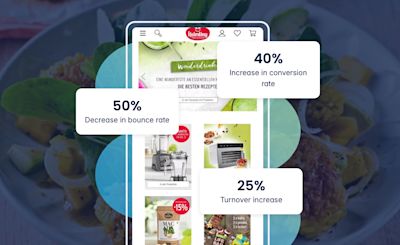
Keimling Naturkost, a leading provider of vegan and raw food products, operated on Magento 1 and migrated to Shopware 6.
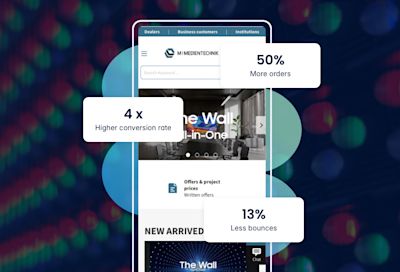
M-Medientechnik migrated from OXID to Shopware 6. Since the relaunch, M-Medientechnik’s conversion rate has been four times higher than with the previous store. In addition, the number of orders has increased by more than 50 percent. The cart abandonment rate was reduced from 16 percent to 3 percent.
Want to switch your ecommerce platform?
Make it easy: connect CRM and Shopware, automate pricing and data flows, and work more efficiently. Get started with Shopware today.
When is the right time to switch ecommerce platforms?
The right time to switch your store system is when your current solution reaches its technical limits, when the effort required for maintenance and bug fixing continues to increase, or when goals such as internationalization, B2B functionality, or new sales channels can no longer be properly supported.
In addition, the switch should be planned outside of your highest-revenue periods to avoid disrupting ongoing operations. Suitable timing includes:
Slower business phases, for example outside of seasonal peaks or major campaigns.
Sufficient internal capacity for testing, data validation, and final approvals.
Planned relaunch or expansion initiatives that can be combined with the new system.
Immediate action is required when:
Manufacturer support has ended.
Security or stability issues occur.
Integrations or updates are repeatedly delayed or failing.
Business goals cannot be implemented.
Switching ecommerce platform – frequently asked questions
Does my current store need to go offline during migration?
No. The new store is built in parallel. The actual switchover typically takes only a few minutes if data and systems are prepared.
Which data can be migrated?
Typically, products, variants, categories, customer accounts, orders, media, and many CMS contents can be migrated. The scope depends on the source system. In most migrations to Shopware, nearly the entire shop can be transferred.
Will I lose my Google ranking when switching shop systems?
Not if all relevant URLs are redirected with 301 redirects and content is fully transferred.
How much does switching ecommerce platforms cost?
Costs vary widely. Small shops often range between €5,000–€20,000. Mid-sized shops typically range between €20,000–€80,000. Complex setups (B2B, ERP integrations) can exceed €100,000.
Do I need an agency for migration?
Not necessarily. Smaller shops may handle migration independently. Larger projects or those with many integrations benefit from Shopware partner support to avoid delays and errors.
When should I not migrate?
Avoid switching during peak periods such as Black Friday, holiday seasons, or major assortment or process changes. Choose stable and quiet business periods instead.