
In our recent Shopware CLI posts, we introduced new ways to create a Shopware project and manage the daily local development workflow with project dev. Our latest CLI enhancement tackles one of the most talked-about parts of the developer lifecycle: upgrades.
A Shopware upgrade is rarely just a version-number change. Developers need to know whether the project is ready, which extensions can move to the target version, whether Composer can resolve the dependency set, and what still needs attention before anything changes.
The new project upgrade command brings those steps together in one guided, local-first terminal workflow.
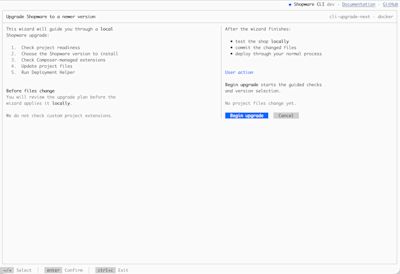
Check first, change later
Preparing an upgrade often means moving between several tools: checking extensions, editing composer.json, running Composer, investigating conflicts, refreshing recipes, and running Deployment Helper.
project upgrade brings those steps into one flow, starting with read-only checks.
Before an upgrade begins, Shopware CLI checks the installed Shopware version, the Git working tree, whether extensions are managed through Composer, whether Deployment Helper is available, and whether PHP and Composer can run in the project’s actual environment.
For Docker projects, those checks run through the configured project executor, so the CLI checks inside the container where appropriate rather than relying on the host machine.
If something blocks the upgrade, the wizard shows it before moving on.
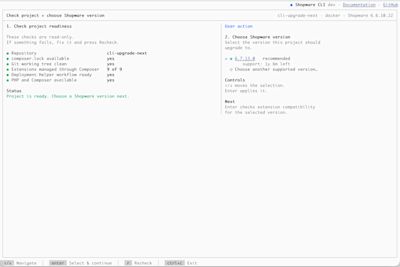
Choose a target, then let Composer verify it
Once the project is ready, the wizard helps you select a target Shopware version. Quick choices cover the recommended release and the latest patch in the current release line, while a searchable picker exposes other supported versions.
After you choose a target, the CLI prepares the upgrade without modifying the project.
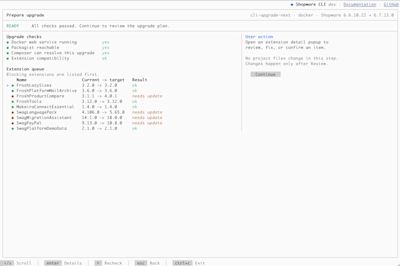
Extension compatibility metadata is useful, but it does not always tell the full story. Repository metadata can be incomplete or outdated, so the wizard combines those signals with a Composer dry run to check whether the target dependency set can actually be resolved before changing the project. Where those signals disagree, the wizard avoids treating incomplete metadata as definitive proof of incompatibility.
From preparation to execution
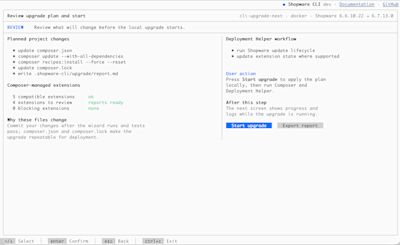
Before anything changes, the wizard shows the proposed upgrade for review. Once you start, Shopware CLI backs up composer.json and composer.lock, updates the Composer requirements, runs composer update --with-all-dependencies, refreshes Symfony Flex recipes, runs Shopware Deployment Helper, and writes an upgrade report.
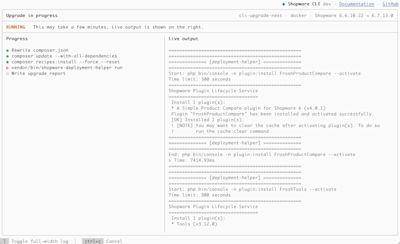
Progress stays visible in the terminal. If an essential step fails or the process is cancelled, the CLI restores composer.json and composer.lock and writes a failure report.
Scriptable, not just interactive
The same workflow also works without the interactive TUI, making it useful in CI, scripts, and agent-assisted development:
shopware-cli project upgrade \
  --no-interaction \
  --target latest-patch \
  --dry-run
In non-interactive mode, the target must be explicit. You can use a concrete supported version, recommended, or latest-patch.
With --dry-run, Shopware CLI performs the readiness checks, extension analysis, and Composer resolution, shows the planned changes, writes a report, and stops before modifying the project.
A report you can share
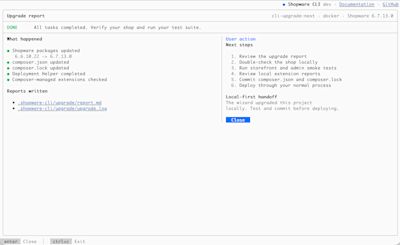
Every upgrade produces a Markdown report at:
.shopware-cli/upgrade/report.md
It includes the source and target versions, readiness results, PHP requirements, planned changes, extension findings, extension changelogs where available, and Composer package changes. If dependency resolution fails, the Composer report is included too.
The upgrade also keeps a log under .shopware-cli/upgrade/, making it easier to share the current state with a colleague, agency, extension vendor, hosting provider, support engineer, or coding agent.
A guide, not a promise of one-click compatibility
The wizard is designed to make upgrades more predictable, not to guarantee that it will catch every issue or that every project can be upgraded automatically.
This first version focuses on the checks we can perform relatively reliably today. Some compatibility issues will still require manual review, testing, or input from extension vendors, hosting providers, or Shopware support. Future iterations will aim to make these checks more accurate and granular as we learn from real-world upgrade cases.
The wizard also cannot make an incompatible third-party extension compatible, rewrite custom plugin code, create a missing vendor release, or remove hosting constraints.
After a successful upgrade, review the changes, test the shop and extensions, commit the resulting Composer files, and deploy through your usual process.
Help us shape what comes next
This is just the MVP of project upgrade - the first chapter, not the last. We will continue to enhance this feature with more capabilities through the rest of 2026, to solve more and more complex challenges.
Try project upgrade on a branch or disposable copy of a real project. We’d love to hear about incomplete extension metadata, difficult Composer conflicts, checks that happen too late, information missing from the generated report, and any other ideas or suggestions for where the workflow should go next. File your ideas and bug reports in the Shopware CLI issue tracker, where you can also follow our plans for future iterations and leave comments on related tracking issues. When reporting an upgrade issue, a redacted copy of .shopware-cli/upgrade/report.md is particularly useful.