On 9 November we published the Shopware SDK for Go. It gives Go developers the same foundation that the PHP and JavaScript SDKs give their ecosystems: app registration, signed webhooks and requests, shop storage and an authenticated Admin API client. The SDK is open source under the MIT license, supports Go 1.26 and 1.27, and ships as three independently versioned modules, all at v1.0.0.
This post walks through building a small Shopware app with it: registering the app, reacting to a product webhook, adding an action button to the Administration and calling the Admin API. At the end we look at the part that is new compared to the other SDKs: an Admin API client you can use on its own, without the app system.
What does the SDK offer?
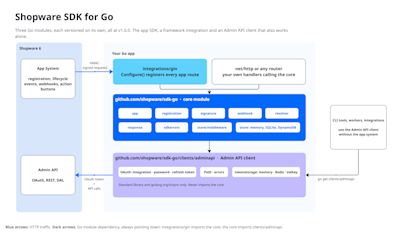
Registration of the app with a shop, including the confirmation step, secret rotation and the activate, deactivate and delete lifecycle events.
Verification and signing: HMAC-SHA256 checks on every webhook and signed request, replay protection with a freshness window, and signed responses back to Shopware.
Shop storage behind one interface, with in-memory, SQLite and DynamoDB implementations.
Admin API client with OAuth token management, one shared token per shop and pluggable token storage (Redis, Valkey or any key-value store).
Response builders for notifications, reloads, modals, payments and refunds.
Gin integration that registers all standard app routes with one call. The core works with
net/httpor any other router.
When to use it
Your app backend is a Go service, or you want a small static binary that runs anywhere.
You run several instances and want shop credentials and Admin API tokens in shared storage (SQLite or DynamoDB for shops, Redis or Valkey for tokens) without writing that plumbing yourself.
You only need the Admin API, not the app system: a CLI tool, a worker or an integration that talks to a shop with integration credentials. Install just
clients/adminapi.
How to get started?
We use Go 1.26 or newer and the Gin web framework. The core SDK has no framework dependency; Gin support lives in its own module, so you only pull it in when you want it.
- mkdir go-shopware-app && cd go-shopware-app
- go mod init example.com/go-shopware-app
- go get github.com/shopware/sdk-go
- go get github.com/shopware/sdk-go/integrations/gin
Create a main.go that configures the app server. The SQLite store keeps registered shops between restarts and needs no CGo, so the binary builds with CGO_ENABLED=0.
- package main
- import (
- "log"
- "log/slog"
- "github.com/gin-gonic/gin"
- ginintegration "github.com/shopware/sdk-go/integrations/gin"
- "github.com/shopware/sdk-go/store"
- )
- func main() {
- shopStore, err := store.NewSQLiteStore(store.SQLiteConfig{DatabasePath: "./shops.db"})
- if err != nil {
- log.Fatal(err)
- }
- defer shopStore.Close()
- router := gin.Default()
- logger := slog.Default()
- err = ginintegration.Configure(router, ginintegration.Config{
- AppName: "GoShopwareApp",
- AppSecret: "my-app-secret-min-8-chars",
- ConfirmationURL: "http://localhost:3000/app/register/confirm",
- ShopStore: shopStore,
- Logger: logger,
- })
- if err != nil {
- log.Fatal(err)
- }
- log.Fatal(router.Run(":3000"))
- }
Configure registers GET /app/register, POST /app/register/confirm and the three lifecycle routes POST /app/activate, /app/deactivate and /app/delete. Every one of them verifies the Shopware signature and signs its response. Start the server:
- go run .
Registering your app with Shopware
Create the app in your Shopware installation under custom/apps/GoShopwareApp with a manifest.xml. The registration URL and the webhooks point at the routes the SDK registered. The secret must match AppSecret.
- <?xml version="1.0" encoding="UTF-8"?>
- <manifest xmlns:xsi="http://www.w3.org/2001/XMLSchema-instance"
- xsi:noNamespaceSchemaLocation="https://raw.githubusercontent.com/shopware/platform/trunk/src/Core/Framework/App/Manifest/Schema/manifest-2.0.xsd">
- <meta>
- <name>GoShopwareApp</name>
- <label>Go Shopware App</label>
- <author>Your name</author>
- <copyright>(c) 2026</copyright>
- <version>1.0.0</version>
- <license>MIT</license>
- </meta>
- <setup>
- <registrationUrl>http://localhost:3000/app/register</registrationUrl>
- <secret>my-app-secret-min-8-chars</secret>
- </setup>
- <permissions>
- <read>product</read>
- </permissions>
- <webhooks>
- <webhook name="appActivated" url="http://localhost:3000/app/activate" event="app.activated"/>
- <webhook name="appDeactivated" url="http://localhost:3000/app/deactivate" event="app.deactivated"/>
- <webhook name="appDeleted" url="http://localhost:3000/app/delete" event="app.deleted"/>
- <webhook name="productWritten" url="http://localhost:3000/app/webhook/product" event="product.written"/>
- </webhooks>
- </manifest>
Install the app with bin/console app:install --activate GoShopwareApp. Shopware calls the registration route, confirms with the shop's API credentials and sends the app.activated webhook. The SDK stores the shop, its secret and its credentials in SQLite and marks it active. Three responses with 204 No Content in the server log mean the shop is registered.
One detail worth knowing: each lifecycle route accepts only its own event. A valid app.activated payload replayed against /app/delete is rejected with 403, so a captured request cannot be turned into a different mutation.
Receiving a webhook
The manifest sends product.written to /app/webhook/product, a route we define ourselves. WebhookMiddleware verifies the signature, checks the timestamp, loads the shop and puts both the shop and the parsed event into the Gin context. For entity webhooks the payload is a list of changes.
- router.POST("/app/webhook/product",
- ginintegration.WebhookMiddleware(sdk, logger),
- func(c *gin.Context) {
- shop, _ := ginintegration.GetShop(c)
- event, _ := ginintegration.GetVerifiedEvent(c)
- var changes []webhook.EntityChange
- if err := event.Data.UnmarshalPayload(&changes); err != nil {
- c.Status(http.StatusBadRequest)
- return
- }
- for _, change := range changes {
- log.Printf("shop %s: %s %s %s", shop.ShopID, change.Operation, change.Entity, change.PrimaryKey)
- }
- c.Status(http.StatusNoContent)
- })
WebhookMiddleware takes the *app.App and a *slog.Logger; the core SDK itself never logs, only the integration does. To get the App, build it yourself and hand it to Configure instead of the individual fields. That is also what you need for the Admin API client later.
- sdk, err := app.New(app.Config{
- AppName: "GoShopwareApp",
- AppSecret: "my-app-secret-min-8-chars",
- ConfirmationURL: "http://localhost:3000/app/register/confirm",
- ShopStore: shopStore,
- })
- if err != nil {
- log.Fatal(err)
- }
- err = ginintegration.Configure(router, ginintegration.Config{App: sdk, Logger: logger})
Save a product in the Administration and the change shows up in the log.
Adding an action button
Action buttons let merchants trigger your app from the Administration. Add one to the product list in the manifest:
- <admin>
- <action-button action="syncProducts" entity="product" view="list" url="http://localhost:3000/action-button/sync">
- <label>Sync products</label>
- </action-button>
- </admin>
Shopware sends a signed JSON POST with the selected IDs. It is not a webhook event, so we verify it with the resolver's ResolveFromPost, which checks the signature and the shop state and leaves the body in place for our handler. Shopware expects the response to be signed as well, so we sign the body with the shop secret before writing it.
- router.POST("/action-button/sync", func(c *gin.Context) {
- shop, err := sdk.Resolver().ResolveFromPost(c.Request.Context(), c.Request)
- if err != nil {
- c.AbortWithStatus(http.StatusUnauthorized)
- return
- }
- var req struct {
- Data struct {
- IDs []string `json:"ids"`
- } `json:"data"`
- }
- if err := c.ShouldBindJSON(&req); err != nil {
- c.AbortWithStatus(http.StatusBadRequest)
- return
- }
- body, _ := json.Marshal(response.NotificationSuccess(
- fmt.Sprintf("%d products queued for sync", len(req.Data.IDs)),
- ))
- c.Header(signature.AppSignatureHeader, signature.ComputeSignature(body, shop.ShopSecret))
- c.Data(http.StatusOK, "application/json", body)
- })
The response package has builders for the other action button results too: reload the page, open a URL in a new tab or open a modal.
Calling the Admin API
Most apps need to read or write data after an event. NewClientForShop returns an Admin API client for the shop that sent the request. The client logs in with the shop's integration credentials on the first call, keeps the token, refreshes it before it expires and retries once on 401. All clients of a shop share one token. Inside the webhook handler from before:
- client, err := sdk.NewClientForShop(shop)
- if err != nil {
- c.Status(http.StatusInternalServerError)
- return
- }
- for _, change := range changes {
- resp, err := client.Get(c.Request.Context(), adminapi.Path("product", change.PrimaryKey))
- if adminapi.IsNotFound(err) {
- continue // deleted in the meantime
- }
- if err != nil {
- log.Printf("fetch product %s: %v", change.PrimaryKey, err)
- continue
- }
- var product struct {
- Data struct {
- Name string `json:"name"`
- } `json:"data"`
- }
- if err := resp.JSON(&product); err == nil {
- log.Printf("product %s is now %q", change.PrimaryKey, product.Data.Name)
- }
- }
Paths are relative to /api. adminapi.Path escapes each segment, so an ID taken from a payload cannot change the path. Reading products needs the <read>product</read> permission from the manifest.
The Admin API client on its own
This is where the Go SDK differs from the other two. The client lives in its own module, github.com/shopware/sdk-go/clients/adminapi, depends only on the standard library and golang.org/x/sync, and never imports the app SDK. If you are writing a CLI tool, a worker, or an integration that talks to a shop without being a Shopware app, install just the client:
- go get github.com/shopware/sdk-go/clients/adminapi
Create an integration in the Administration under Settings, System, Integrations and use its access key ID and secret:
- client, err := adminapi.NewClient(adminapi.Config{
- BaseURL: "https://shop.example.com",
- Credentials: adminapi.IntegrationCredentials{
- ClientID: os.Getenv("SHOPWARE_CLIENT_ID"),
- ClientSecret: os.Getenv("SHOPWARE_CLIENT_SECRET"),
- },
- })
- if err != nil {
- return err
- }
- resp, err := client.Get(ctx, "/_info/version")
- if err != nil {
- return err
- }
- var info struct {
- Version string `json:"version"`
- }
- if err := resp.JSON(&info); err != nil {
- return err
- }
- fmt.Println("Shopware", info.Version)
The same client supports admin user login with username and password, and your own Credentials implementation for other grants.
Tokens stay in memory by default; Config.TokenStorage moves them to Redis, Valkey or any key-value store so several processes share one token, with optional encryption. The app SDK uses exactly this client under the hood, so everything you learn here applies to apps as well.
The client is based on shopwareLabs/go-shopware-http-client, originally created by Friends of Shopware, and continues in the official SDK with the agreement of its owner.
Conclusion
In a few dozen lines we registered an app with a shop, handled a product webhook, added an action button and called the Admin API, with signatures, replay protection and token management handled by the SDK. We did not cover the DynamoDB store, the retry middleware for stores, the net/http setup without Gin, or payment and refund responses. The repository has runnable examples for Gin, plain net/http and an Administration extension, plus guides on getting started, usage, deployment and token storage.
The API reference is on pkg.go.dev.
If you build something with the SDK or miss a feature, open an issue or a discussion on GitHub.