Shopware CLI’s new ai commands give builders one place to discover and connect Shopware AI integrations. They address a broader challenge the industry is still working through: agent capabilities are appearing in more places, while the ways to find, assess and install them remain fragmented.
There are different approaches to organizing, distributing, and assessing agent capabilities, and the ecosystem is still evolving. Skills often live in Git repositories and client marketplaces: An example is NVIDIA’s Agent Skills repository, which collects skills mirrored from product repositories and supports installation through Vercel’s Skills CLI. Meanwhile, the MCP Skills Extension proposal, SEP-2640, describes how MCP servers can list and serve Skills to connected clients. The approaches differ, but both address the same need: helping builders find a capability that fits the task.
Shopware faces this challenge within its own ecosystem. Integrations come from different teams, with setup details spread across repositories and documentation. Builders shouldn’t need to know Shopware’s internal organizational structure to ask, “Does Shopware provide an AI tool that can help me with this?”
Find Shopware AI integrations
Use shopware-cli ai list to browse the directory, or shopware-cli ai info <name> to see an integration’s description, delivery type and documentation.
- shopware-cli ai list
- shopware-cli ai info deployment-helper
The directory currently includes Skills for Shopware CLI workflows, Docker-backed projects, the new capability to anonymize extension data in database dumps, Deployment Helper, and the Acceptance Test Suite, as well as Meteor’s remote MCP server.

The Docker Skill guides assistants toward Shopware CLI's project console workflow in Docker-backed projects. The Deployment Helper Skill covers build and deploy workflows, from preparing a deployment locally to running it on a server. The Acceptance Test Suite Skill supports writing and running Playwright acceptance and accessibility testing.
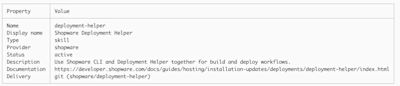
Details about Tooling to help you decide if it’s what you need
Use --type to filter the directory, or --installed to see Shopware integrations the CLI detects as installed or configured. ai list and ai info support --format json, so their output can be used in scripts and automation:
- shopware-cli ai list --format json
From discovery to setup and removal
Shopware CLI delegates skill installation to skills.sh. To install a skill, specify an --agent:
- shopware-cli ai add shopware-cli --agent claude-code
- shopware-cli ai add deployment-helper --agent claude-code
By default, the skill is installed for the current project. Use --global if you’re working in an extension repository rather than a Shopware project; it installs skills at user level without needing a project root. Use --dry-run to preview an add or remove operation. Add @<tag> to select that exact Git ref. Without a tag, the repository’s default branch is used.
- shopware-cli ai add deployment-helper@v0.1.10 --agent claude-code --global --dry-run
Project installs create skill files and a skills-lock.json; commit them to share the setup with your team. Skill installation requires Node.js and npx, plus Git and network access for Git-delivered skills.
To remove a skill:
- shopware-cli ai remove deployment-helper --agent claude-code
MCP integrations use a different setup. For example, shopware-cli ai add meteor writes the Meteor connection to the project’s .mcp.json.
- shopware-cli ai add deployment-helper@v0.1.10 --agent claude-code --global --dry-run
- shopware-cli ai add deployment-helper --agent claude-code
A first iteration
The directory is focused on Shopware-provided integrations; opening it to other efforts in the ecosystem remains a possibility. For now we’ll watch how skills, MCP, and AI clients evolve, including proposals such as SEP-2640, and adjust how Shopware integrations are described and delivered as those conventions mature. In the meantime, the ai command gives Shopware developers a straightforward place to start.
Run shopware-cli ai list to browse the current catalog, inspect a skill that fits your task, and add it to the agent you use.