


B2B buyers now expect digital purchasing to be as convenient as consumer commerce. They want to see their negotiated prices, check availability, request a quote, place a repeat order, and track fulfillment without waiting for a sales representative.
For distributors, meeting those expectations is not a simple storefront project. Product catalogs may contain hundreds of thousands of SKUs. Prices can vary by customer, contract, quantity, and region. Orders may require approval, inventory can sit across several warehouses, and the ERP remains the system of record for customers, pricing, stock, and orders.
Shopware provides a modular commerce platform for building self-service B2B experiences around that complexity. Its value, however, depends on more than enabling features. The Shopware architecture must connect the buying experience with the distributor's operational systems and business rules.
Why B2B distributors need more than a traditional ecommerce store
A traditional ecommerce store is usually designed around a simple relationship: one shopper, one visible price, and one checkout path. Distribution rarely works that way. One customer account may include buyers, approvers, finance users, warehouse employees, and branch managers. Each person may have different permissions, budgets, catalogs, shipping locations, and payment terms.
If the storefront cannot reproduce those rules, buyers fall back to email, phone calls, and spreadsheets. Sales and customer-service teams then re-enter orders, confirm prices, check stock, and provide status updates manually. The website exists, but it does not reduce operational work.
A scalable ecommerce platform for distribution must therefore do two things at once: give buyers a practical self-service experience and preserve the controls that protect pricing, credit, inventory, and fulfillment.
A real-world distribution scenario
Consider an industrial equipment distributor with more than 100,000 products, over 5,000 business customers, several sales representatives, customer-specific pricing, and separate purchasing approval workflows. Its ERP controls inventory and orders, but customers cannot access that information directly.
Buyers call sales representatives for prices, email purchase orders, wait for manual quote approval, and contact support for availability or order status. Many repeat the same process every month. Internal teams spend time processing routine transactions instead of developing accounts and resolving higher-value customer needs.
With a properly configured Shopware B2B portal, each customer can sign in to view the relevant catalog and price, request a quote, upload a bulk order, reorder previous purchases, and follow order status. The capability sits in Shopware; the accuracy comes from integrating Shopware with the systems that own pricing, products, inventory, customer, and fulfillment data.
Shopware B2B features that matter for distributors
Company accounts & buyer permissions
Shopware's B2B Components support employee accounts, organization units, roles, permissions, and order approvals. A distributor can give several users access under one business relationship while controlling who can create, review, approve, or place an order.
This structure can reflect departments, branches, cost centers, budgets, or spending limits. It reduces shared logins and email-based approvals while allowing the customer to manage more of its purchasing process through the portal.
Customer-specific pricing
B2B pricing may depend on a customer contract, account group, quantity, product, or region. Shopware supports advanced and scaled pricing, customer-specific conditions, and sales-channel controls. These can be used to present negotiated prices, exclusive product ranges, and appropriate regional visibility after sign-in.
The critical requirement is price ownership. If contract prices are maintained in the ERP, Shopware should receive them through a governed integration rather than through separate manual maintenance. That reduces discrepancies between the quote, portal, order, and invoice.
Quotes & negotiated orders
For orders that require negotiation, Shopware Quote Management allows a logged-in buyer to create a quote request from the cart. The merchant can review items and quantities, revise the offer, add messages or discounts, and return the quote to the customer. Once accepted, the approved quote can move into the order process without the buyer rebuilding the cart.
Keeping the request, revisions, communication, and status connected to the account gives both sides a clearer process than disconnected email threads and spreadsheets. Sales representatives can focus on exceptions and negotiation rather than re-entering routine details.
Quick order & bulk purchasing
Experienced buyers often know the product numbers and quantities they need. Shopware quick-order capabilities let them enter SKUs directly or import an order file, including CSV-based workflows when configured. Bulk quantity updates make large carts easier to prepare.
For a distributor with a large catalog, this is more useful than requiring buyers to locate and open hundreds of product pages. It reduces ordering effort, limits transcription mistakes, and makes the portal practical for high-line-count orders.
Reordering & shopping lists
Repeat purchasing is central to distribution. Shopping lists allow buyers to save frequently purchased or favorite items, while purchase history and reorder functions give them a faster starting point for recurring orders.
The customer saves time, and the distributor creates a stronger reason to keep routine purchasing inside the portal. Reordering should still validate current price, availability, substitutions, and account permissions before checkout.
Shopware integration architecture
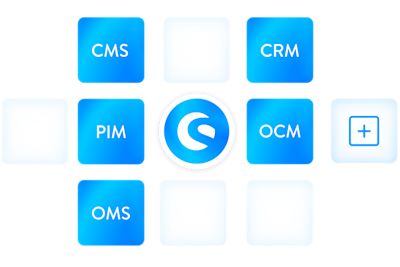
Shopware's API-first ecommerce infrastructure supports integration with the systems that run the distribution business. In a composable commerce architecture, each platform should have a defined role, a clear source of truth, and rules for how data moves.
ERP
The ERP commonly owns customer accounts, negotiated pricing, credit terms, inventory, sales orders, and invoices. Integration should send the correct account and price data to Shopware and return accepted orders for processing. The design must also define how cancellations, backorders, taxes, order changes, and status updates are handled.
PIM
A PIM should govern product descriptions, technical attributes, documents, media, category assignments, and channel-ready content. For a catalog of 100,000 products, enrichment standards and publication rules matter as much as data transfer. Shopware should receive complete, sellable product records rather than becoming another place to repair product data manually.
CRM
CRM integration can give sales teams visibility into digital account activity, quote requests, and buying patterns. It can also keep customer ownership and sales-representative assignments aligned. The project should specify which activity belongs in the CRM and avoid duplicating customer records across systems.
WMS
The WMS may hold warehouse-level availability, allocation, pick-pack-ship status, and tracking information. Integration determines whether buyers see total stock, location-specific stock, available-to-promise quantities, or only an availability message. That choice should reflect the distributor's fulfillment rules.
APIs & Webhooks
Shopware provides an Admin API for backend data and operational integrations and a Store API for storefront, cart, checkout, sales-channel, mobile, and headless experiences. Webhooks can notify connected services when relevant events occur.
APIs do not automatically make an integration real time or reliable. The solution still needs authentication, data mapping, queues, retries, error handling, monitoring, and reconciliation. High-volume catalog or order flows should be tested under realistic load before launch.
Using Shopware rules to automate distributor workflows
Shopware Rule Builder lets teams define conditions that influence pricing, shipping, payment, promotions, and customer segmentation. A distributor might restrict a payment method to approved account groups, apply a freight rule by destination and order value, show a product range only in selected markets, or trigger a volume price when a quantity threshold is met.
Rules can reduce hard-coded customizations and make routine changes easier. They also require governance. Teams should document rule ownership, priority, exceptions, testing, and approval. When a rule depends on ERP data, the integration must deliver that data in time for Shopware to make the correct decision.
Where AI fits into B2B distribution
AI is most useful when it removes a defined point of friction. For distributors, that may mean search that understands technical terminology, recommendations based on account history, product-data enrichment from supplier documents, service agents that answer order-status questions, or demand signals that support inventory planning.
Shopware's extensibility allows AI services to be introduced through native capabilities, apps, or integrations. The commerce platform should not be treated as the only data source. Search and recommendations need accurate product and account data; order assistance needs current ERP and WMS information; and personalization must respect contract pricing, permissions, and catalog restrictions. AI should follow the connected data foundation, not compensate for its absence.
What to validate before implementing Shopware
The most important implementation work happens before configuration begins. Validate the following areas against actual customer accounts, products, orders, and exceptions:
Account model: company hierarchies, buyer roles, approvers, departments, budgets, addresses, and sales-representative ownership.
Pricing logic: system of record, contracts, quantity breaks, regional rules, promotions, currencies, taxes, and effective dates.
Catalog model: SKU volume, variants, units of measure, customer assortments, attributes, documents, and restricted products.
Order workflow: quick order, CSV format, quotes, approvals, payment terms, credit checks, backorders, substitutions, and cancellations.
Inventory promise: which system owns stock and whether the portal shows on-hand, available, warehouse-level, or available-to-promise quantities.
Integration behavior: direction, frequency, latency, batch size, retries, reconciliation, monitoring, and ownership when data fails.
Performance and scale: realistic catalog size, concurrent users, search behavior, peak orders, price lookups, imports, and integration load.
Edition and extension fit: confirm which B2B Components, commercial plan, apps, and custom development are required before estimating scope.
Security and governance: roles, API permissions, audit needs, personal data, retention, and change control.
A proof of concept should test the hardest workflows, not only a standard checkout. Use real examples such as a multi-user account with an approval limit, a customer-specific price, a 200-line CSV order, a revised quote, and an item fulfilled from more than one warehouse.
Is Shopware right for your distribution business?
Shopware is a strong candidate when your business needs:
A flexible B2B portal with company users, permissions, approvals, quotes, quick order, and shopping lists.
A modular commerce platform that can connect with existing ERP, PIM, CRM, and WMS investments.
API-led or headless options for differentiated storefront and buyer experiences.
Rules that business teams can adjust without turning every operational change into a custom-development project.
Room to extend the solution as products, accounts, channels, regions, and transaction volumes grow.
Investigate the fit more carefully when:
Your requirements depend on a highly specialized feature that is not available in the selected Shopware plan or B2B Components.
ERP data is incomplete, unreliable, or cannot be exposed at the speed the buyer experience requires.
Most workflows would require deep customization with no clear upgrade and maintenance strategy.
The organization has not agreed on system ownership, pricing rules, catalog governance, or post-launch support.
The decision should be based on end-to-end workflow fit and total operating responsibility, not on a feature checklist alone. A technically capable platform can still underperform if integration, data governance, adoption, and ongoing ownership are weak.
Business impact
When Shopware capabilities and enterprise integrations are designed together, distributors can move routine purchasing from assisted channels to self-service, reduce duplicate data entry, give buyers clearer access to prices and order status, and let sales teams focus on exceptions and account development.
The impact should be measured against a baseline rather than described with generic percentages. Useful pre- and post-launch measures include:
Share of orders placed through self-service channels
Average time from quote request to approved order
Manual touches and data-entry corrections per order
Pricing and catalog-related support requests
Order status inquiries handled by customer service
Repeat-order completion time and cart abandonment
Integration failures, reconciliation exceptions, and recovery time
Portal adoption by customer account, buyer role, and sales territory
These measures show whether the implementation is improving the distributor's operation, not merely moving an existing manual process onto a new screen.
Build a connected B2B commerce foundation
Shopware can provide the storefront and B2B capabilities distributors need, but sustainable growth comes from the connected foundation behind them. Pricing must remain consistent. Product data must be complete. Inventory and order status must be current. Approval and quote workflows must match the way customers actually buy.
Klizer helps manufacturers and distributors design and implement Shopware as part of a Connected Commerce environment. We align the storefront with ERP, PIM, CRM, WMS, and operational AI so that the buying experience and the systems running the business work together.
If you are evaluating Shopware or replacing a disconnected B2B portal, start with a review of your pricing, account, catalog, order, and integration requirements. Klizer can help you map the right Shopware architecture before implementation begins.
Further B2B insights
Download the B2B ecommerce compass to discover the six critical action areas companies must address now to build a resilient, high-performing B2B ecommerce business for the future.
Watch the B2B Future Forum, our webinar series where Shopware experts explain what’s changing in B2B commerce, why it matters, and how organizations can adapt strategically.
Discover Shopware’s modular solution for next-level B2B ecommerce