

Shopware 6.6 already delivered a solid administration experience, but we knew we could push performance even further. With Shopware 6.7, we've taken that foundation and supercharged it through targeted optimizations – from how fonts load to how components initialize.
The results: pages that took around 5 seconds in 6.6 now load in just 1 second in 6.7. That's an 80% reduction in load time! Let's explore what changed.
Performance benchmarks
We measured performance using Lighthouse across three critical pages in the administration:
| Page | Version 6.6 | Version 6.7 | Improvement |
|---|---|---|---|
| Login | 4.9s load time | 1.4s load time | 71% faster |
| Product listing | 5.0s load time | 1.9s load time | 62% faster |
| Settings | 5.0s load time | 1.9s load time | 62% faster |
But that's not all. When HTTP/2 is enabled on the server (which allows parallel asset loading), the improvements are even more dramatic:
| Page | Version 6.6 | Version 6.7 (with HTTP/2) | Improvement |
|---|---|---|---|
| Login | 4.9s load time | 1.0s load time | 80% faster |
| Product listing | 5.0s load time | 1.1s load time | 78% faster |
| Settings | 5.0s load time | 1.0s load time | 80% faster |
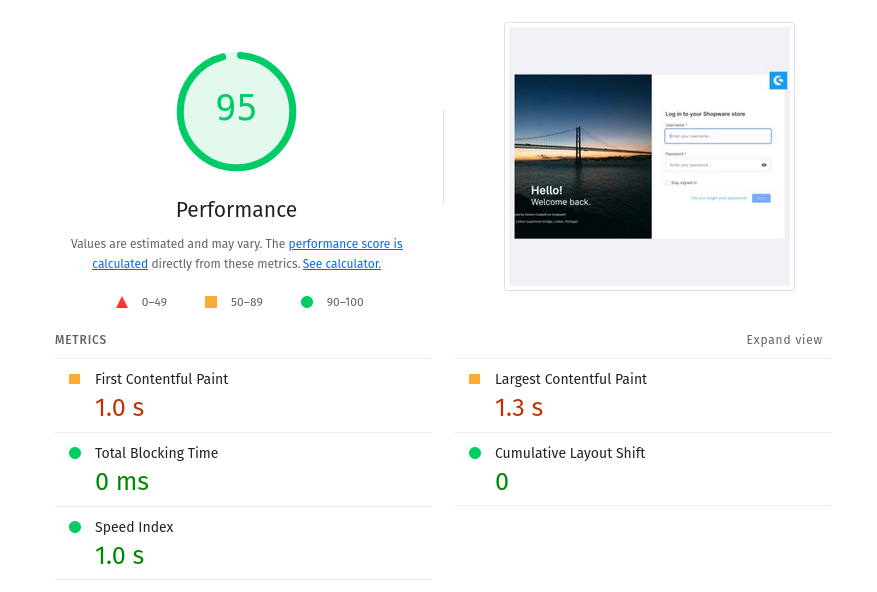
The login page's Lighthouse score jumped from 57 to 95 – a 67% improvement. With HTTP/2 enabled, all pages achieve sub-second load times.
What changed under the hood
We made targeted improvements across four key areas of the administration:
Smarter asset loading
Optimized font loading
We separated font files from the main CSS bundle. In 6.6, fonts were bundled into a single large CSS file that needed to load before rendering could begin. In 6.7, fonts load in individual files in parallel. The browser can now start rendering the interface immediately while fonts load in the background. This change alone cut initial render time significantly.
Parallel component initialization
The administration now loads components in parallel rather than sequentially. Think of it like opening multiple browser tabs at once instead of waiting for each page to load before opening the next. Initializers that used to load one after another now load simultaneously, and we combine them into a single optimized chunk. The result? The administration becomes interactive up to 70% faster.
Asynchronous components
We converted many synchronous components to load asynchronously. This means the browser doesn't wait for every component to download before showing you the interface. Instead, it loads what you need first, like the product list or order overview, and fetches supporting components in the background. You see content faster, and the administration feels more responsive.
Leaner bundles
Improved tree-shaking in Meteor Design System
Tree-shaking is the process of removing unused code from the final bundle. We improved this behavior in the Meteor design system (our component library) to ensure that only the components you actually use get downloaded. We also migrated from lodash to lodash-es, a more modern version that works better with bundler optimization. The result? Smaller, more efficient component bundles that download faster.
WebP image format
We converted 36 images in the administration from PNG and JPG formats to WebP. This modern image format provides better compression while maintaining visual quality. The savings are substantial: we freed up 912 kB in total. That's nearly 1 MB less data to download. The login background image alone dropped by 178 kB. On slower connections, this translates to noticeably faster initial page loads.
Caching done right
Smart cache headers
The administration now sends proper cache control headers (max-age=3600 and stale-while-revalidate=86400). Your browser caches resources for an hour and continues using them for up to 24 hours while checking for updates in the background. After your first login, subsequent sessions load almost instantly without re-downloading unchanged assets.
Better boot process
Optimized boot order
We reorganized how the administration initializes. Critical components like authentication and navigation now load first. Less critical features initialize in the background after the interface becomes interactive, so you're not waiting for features you might not even use.
Non-blocking snippet loading
Snippets (the translations for the administration interface) now load asynchronously. The interface renders immediately with default content, and translations populate as they arrive. You can start working right away while the snippet system finishes loading in the background.
Improved loading indicator
We added a better loading indicator that appears after 2 seconds and stays visible for at least 300ms. This might seem like a minor detail, but it significantly improves the perceived performance. Instead of wondering if the page is frozen, you get clear visual feedback that things are loading. The psychological impact is real, knowing something is happening makes the wait feel shorter.
Technical deep dive (for developers)
If you're interested in the technical details behind these improvements, we've documented everything in GitHub pull requests:
- PR #13600 – Core performance improvements including font loading, parallel initialization, and async components (available in 6.7.5.0)
- PR #979 – Meteor design system tree-shaking improvements (available in 6.7.5.0+)
- PR #13837 – WebP image conversion (available in 6.7.6.0)
- PR #14222 – Cache control header implementation (available in 6.7.7.0)
- PR #13902 – Loading indicator improvements (available in 6.7.6.0)
These PRs include detailed explanations of the changes, performance benchmarks, and the reasoning behind each optimization. If you're building extensions or working with the administration code, these resources will help you understand how to maintain and build upon these performance improvements.
When can you experience this?
These performance improvements rolled out across several 6.7 minor releases:
- 6.7.5.0 introduced the core performance improvements and Meteor optimizations
- 6.7.6.0 added WebP images and the improved loading indicator
- 6.7.7.0 implemented smart cache control headers
Our final performance testing used the latest trunk version as of January 23, 2026, which includes all these optimizations working together. If you're already running Shopware 6.7, you can upgrade to the latest minor version to get these improvements immediately.