

We've recently expanded our Deployment Helper documentation with more guidance for different deployment setups, configuration, extension management, staging, and troubleshooting. So it seems like a good time to also take a look under the hood at one of the recent improvements we've made to the Deployment Helper itself.
The Deployment Helper is a small tool that takes care of the boring-but-critical part of a Shopware deployment: running the migrations, syncing the theme, and bringing every plugin into the state your project expects. Instead of scripting bin/console plugin:install, plugin:update, plugin:activate and friends yourself, you run one command and it figures out what needs to happen.
Recently our SaaS team wanted to adopt the Deployment Helper for their own deployments to simplify their setup. A great validation of the tool, but they came back with an unpleasant observation: it was slower than their hand-rolled installation. When you are deploying many times a day, that matters.
So we went digging and ended up building a small plugin planner that looks for plugins that can safely be installed together and batches them into fewer console calls. This feature shipped in Deployment Helper 0.1.0: If you are already using Deployment Helper, you get it for free on upgrade - no configuration needed.
This post covers what we learned while building the planner, why installing Shopware plugins is trickier than it looks, and how we made it faster.
Where the time goes
The first thing to understand is what actually happens when the Deployment Helper installs your plugins. For every plugin that needs installing, it runs something like:
- bin/console plugin:install --activate MyPlugin
That looks cheap, but it isn’t: Each call starts a fresh PHP subprocess that boots the entire Shopware kernel before it does any real work. On a shop with 30 plugins, that means 30 kernel boots, one after another. The kernel boot, not the plugin installation itself, dominates the wall-clock time.

The red blocks are kernel boots. In the per-plugin flow, most of the timeline is just Shopware booting up, over and over again.
The SaaS team avoided this in their own installation routine by being smarter about batching. The Deployment Helper, doing one plugin per command, was still paying the boot cost over and over.
The fix was to use batching support that already exists: plugin:install already accepts more than one plugin at once.
- bin/console plugin:install PluginA PluginB PluginC
One subprocess, one kernel boot, three plugins installed. If we batch installs like this, we pay the boot cost only once instead of N times.
But there’s a catch: you can't just throw every plugin into one big command. Plugins have dependencies on each other, and that is where it gets interesting.
Why you can't just install everything at once
Shopware plugins can depend on other plugins. A payment plugin might require a base plugin that provides shared services. When that is the case, order matters: the base plugin has to be installed before the one that depends on it, otherwise the install blows up because the required services aren't available yet.
So before we can do anything, we need to know the dependency relationships between the plugins and install them in the right order. The problem is that Shopware doesn't hand us this graph on a plate. We have to reconstruct it.
The pieces we have are:
bin/console plugin:list --jsongives us the installed plugins, each with its technical name (SwagPaymentPayPal), its Composer package name (swag/paypal), and its path on disk.Each plugin's own
composer.jsonhas arequiresection that tells us which packages it needs.The project's
composer.locktells us aboutreplacealiases, which we'll get to in a second.
The idea is straightforward: walk every plugin's require, and whenever it requires another plugin from the list, record an edge in a dependency graph. Then resolve that graph into a linear order where every dependency comes before the plugins that need it. A classic topological sort.
A few details make this less straightforward than it sounds.
A require only counts if the other side is actually a plugin. Plugins require all sorts of things in their composer.json: shopware/core, PHP extensions, third-party libraries. None of those are plugins we manage, so they don't create an edge. A dependency only exists when a plugin requires another plugin that is present in the same list.
Only the requiring side is a "dependency". If plugin A requires plugin B, then A has a dependency. B does not suddenly have a dependency just because something points at it. This sounds pedantic, but it turns out to be the key insight that makes parallel installation safe later.
Dependencies are transitive. If A needs B, and B needs C, the install order has to be C, then B, then A - not just the direct pairs. A proper topological sort handles this for you.
Package names can be aliased. Here is the fun one. A plugin from the Shopware Store might be published under a package name like store.shopware.com/swagpaypal, while another plugin requires it simply as swag/paypal. These are the same plugin, but the strings don't match. Composer solves this with replace, and the lock file records it. So before we try to match a require against the list of plugins, we apply the replace aliases from composer.lock. Otherwise we would miss real dependencies and install things in the wrong order.
Cycles are fatal. If the plugins somehow form a dependency cycle, there is no valid order to install them in. Rather than guessing, we abort. Plugin dependencies are expected to be acyclic, and a cycle is a bug worth surfacing loudly.
When these details are accounted for, we have the plugins in a safe, dependency-respecting order. Now we can think about merging.
Merging installs without breaking the order
Here is the rule we landed on: only plugins that have no dependency on another plugin get merged into a single plugin:install call. Plugins with dependencies still get their own plugin:install call, so their order stays explicit and safe.
At first glance this feels too conservative. Why not batch the dependent ones too? The answer is the insight from earlier: a plugin with no dependencies is safe to install in any order relative to its batch-mates, because nothing in that batch needs anything else in that batch. The moment a plugin depends on another, its position in the sequence matters, and merging it into a batch would risk installing it before its dependency.
So the planner walks the resolved list and collects dependency-free plugins into a pending batch. As soon as it hits a plugin that needs special handling - one that depends on another plugin, or one that needs to be activated as part of the install - it flushes the batch (emits it as one command) and then handles that plugin on its own.
A run ends up looking like this:
- plugin:install P1 P2 P3 # merged: none of them depend on anything
- plugin:install P4 --activate # on its own: needs activation
- plugin:install P5 # on its own: P5 depends on another plugin
- plugin:activate P6 # on its own
- plugin:install P7 P8 # next merged batch
The ordering guarantee falls out of two facts working together:
The plugins arrive in dependency order, so a dependency always comes before the plugins that need it.
A plugin that depends on another is never merged - it is always standalone, and a standalone command flushes the pending batch before it runs.
Take a slightly bigger example. Say we have plugins A, B, C, D and E. A needs B, and B needs C, while D and E depend on nothing:
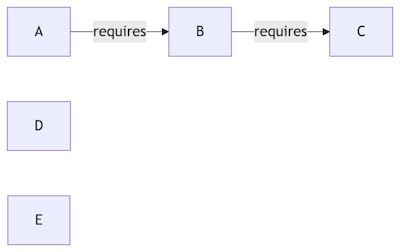
We resolve that graph into an order where every dependency comes first, then walk the list. Dependency-free plugins (C, D, E) drop into a batch; the dependent ones (B, A) are standalone and flush whatever has accumulated before they run. The bold arrows are the resolved order; the dotted arrows show which command each plugin ends up in:
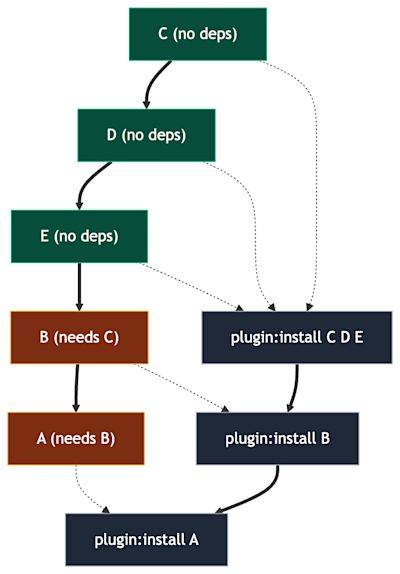
The green nodes have no dependencies and are merged into one command; the orange ones depend on another plugin, so each is installed on its own - and installing them flushes the pending batch first.
C, D and E install together in one command. Then B (which needs C) installs, then A (which needs B). C before B before A - exactly the order we need, and the three independent plugins still get merged wherever it is safe to do so.
There is one more rule worth mentioning: activation is never merged into a batch. A plugin that should be installed and activated gets its own plugin:install --activate call. We never want to activate a plugin as an incidental side effect of grouping it with unrelated installs - activation stays an explicit step.
What it costs you
Merging is not free. When you install plugins one at a time and the third one fails, you know exactly which plugin failed and the first two are done. A merged plugin:install A B C fails as a single unit with a combined error, and how much of the batch took effect is up to Shopware.
We decided this trade is fine, because the whole operation is idempotent: a re-run skips plugins that are already installed or already active, so a retried deployment simply converges on the desired state. You lose a bit of per-plugin failure precision, you gain a lot of deployment speed. For a deploy tool that you run constantly, that is the right call.
The more plugins your project has, the more repeated kernel boots you avoid. For the SaaS team, that turned “it’s slower” into “it’s faster.”
Conclusion
Installing plugins looks like a one-liner until you remember that plugins depend on each other, that the dependency graph isn't handed to you, that package names get aliased, and that going faster means doing fewer but larger commands without ever breaking the install order. None of these are hard on their own; together they are exactly the kind of fiddly, easy-to-get-wrong work you do not want to reimplement in every project's deploy script.
That is the whole point of the Deployment Helper: it takes the boring, error-prone parts of a Shopware deployment and handles them properly, so your deploy is one command instead of a pile of shell glue. And now it does the plugin part faster too.
If you haven't tried it yet, the documentation is a good place to start. Give it a go on your next deployment.