Running one Shopware project locally is straightforward. But running two at the same time has traditionally been less so. Each project wants the same host ports, so the second environment either fails to start or needs its ports changed manually. That works, but it means URLs move around, configuration becomes machine-specific, and scripts or coding agents need to rediscover where a project is running.
The new project proxy command group in Shopware CLI changes that. Instead of assigning ports to projects, it gives each project a stable local hostname with trusted HTTPS and routes traffic through a shared reverse proxy.
A project can now live at an address like:
- https://my-shop123.shopware.local
with no published web ports and without affecting another Shopware project running alongside it.
The feature shipped with Shopware CLI 0.18.0.
How the proxy works
There are two separate jobs involved: resolving the local hostname and routing the request to the right project. Shopware CLI runs a shared DNS and proxy layer for both.
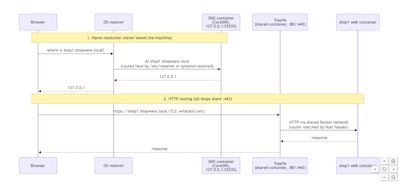
The DNS service resolves *.shopware.local locally, while Traefik routes the request to the correct Shopware container based on the hostname. Projects therefore do not need to publish their own web ports, which removes the port conflict entirely.
For the full architecture, including HTTPS, container-to-container access, exact restore behavior, and the design trade-offs behind the implementation, see the local proxy architecture documentation.
Not just DDEV in a different package
A fair question is: isn’t this what DDEV already does?
At the infrastructure level, there is deliberate overlap. Hostname-based routing, local DNS, trusted HTTPS, and a shared reverse proxy are solved problems, and there is little value in inventing a Shopware-specific version of them. If DDEV is already part of your workflow, there is no reason to replace it.
The difference is what Shopware CLI can build on top of that foundation. Because the proxy is integrated with the project configuration, Shopware CLI can keep APP_URL and sales-channel domains in sync, route Administration and storefront watchers correctly, expose the state in project dev, and restore everything when the proxy is disabled.
And this is only the first use case. Stable, isolated project addresses are a prerequisite for running multiple Shopware environments side by side without port coordination. The same foundation can support the parallel-project workflows we want to add next. So the goal is not to compete with DDEV’s infrastructure layer; it is to make this capability native to Shopware CLI and use it as a building block for workflows that are specific to Shopware development.
Choose a stable local domain during project creation
When you create a Docker-based project, Shopware CLI can now ask for a local domain instead of assigning a fixed web port.
The same option is available non-interactively through --local-domain.
Once selected, the hostname becomes part of the project's configuration:
- https://my-shop123.shopware.local
That means the address stays predictable across restarts. Bookmarks keep working, scripts can rely on it, and tools interacting with the project no longer need to discover a changing port.
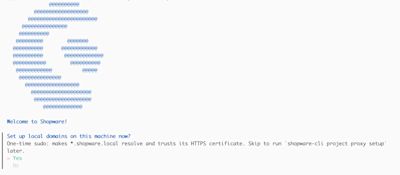
Project creation also asks separately whether the machine-level proxy setup should be performed immediately or deferred until later.
Configure DNS and HTTPS once
A local hostname needs two things outside the project itself: the operating system needs to resolve it, and the browser needs to trust its certificate.
Shopware CLI handles that through:
- shopware-cli project proxy setup
The setup configures local DNS and installs a local certificate authority into the available trust stores. Project creation can also run this step inline.
Because these are machine-level changes, the initial setup may require administrator approval. Once it has been completed, future projects reuse the same configuration and do not need another setup step.
The project dev Overview reports the relevant state through health checks such as:
Local domains enabled
Local certificate trusted
The setup is supported on macOS and Linux. On Windows, Shopware CLI should be run inside WSL2.
Start developing as usual
Once the project exists, the normal development workflow does not change:
- cd my-shop123
- shopware-cli project dev
project dev starts the shared proxy automatically when the project uses a local domain.
If the proxy cannot start, the development environment falls back to fixed local ports instead of preventing the project from starting altogether.
Existing port-based projects can opt into the proxy separately:
- shopware-cli project proxy up
The remaining commands cover the lifecycle around it:
- shopware-cli project proxy status
- shopware-cli project proxy list
- shopware-cli project proxy down
- shopware-cli project proxy teardown
proxy down deregisters the project and restores the project's APP_URL, sales-channel domain, and configuration. proxy teardown removes the shared infrastructure once no projects are using it.
Under the hood, one shared Traefik container routes requests by hostname. Individual shops therefore do not publish their web ports to the host. An embedded DNS server resolves *.shopware.local to 127.0.0.1, while the local CA provides certificates for HTTPS.
Parallel projects do not have to use the default Shopware setup, either. Existing compose.override.yaml customizations continue to work, additional services such as Redis can run alongside Shopware, and project-specific proxy routing is preserved. Services such as OpenSearch remain isolated per project, so customized, customer-like environments can run in parallel without colliding with one another.
One Overview for the local environment
The project dev Overview also benefits from having stable addresses.
It can expose the storefront and Administration URLs alongside links to development services such as Adminer and Mailpit, combined memory usage, and health information for the local environment.
Watchers receive their own predictable hostnames as well. For example:
- admin-watch.<shop>
- storefront-watch.<shop>
This means the proxy is not only routing the main Shopware application. The surrounding development workflow can use the same hostname-based model.
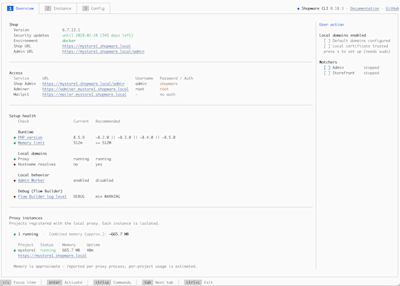
There is one exception worth calling out. The storefront watcher still uses the deprecated webpack-based path, where the WebSocket target is hardcoded in vendor code. Shopware CLI applies a small runtime patch so that traffic can still be routed through the proxy. This can disappear once the watcher moves to Vite.
Find the layer that is actually broken
Local networking involves more pieces than it first appears:
- Docker → local DNS → operating-system resolution → reverse proxy → trusted HTTPS
When one of them fails, "the local environment doesn't work" does not tell you very much.
proxy verify checks that chain in order and stops at the first failing layer:
- shopware-cli project proxy verify
The result points to the part that needs attention rather than leaving you to work backwards from a browser error.
Checks cover cases such as occupied ports, missing administrator permissions, DNS interference, proxy startup, and certificate trust. The output:
- shopware-cli project proxy verify
- ✓ Docker is running
- ✓ DNS server answers *.shopware.local
- ✓ OS resolves *.shopware.local to 127.0.0.1
- ✓ Shared proxy is running on port 443
- ✓ HTTPS works and is trusted (https://proxy.shopware.local/ping)
- ✓ This machine is ready, run "shopware-cli project proxy up" in any shop
There is also a valid idle state: if the machine setup is correct but no project has started the shared proxy yet, proxy verify reports that rather than treating it as a broken installation.
Why stable domains matter beyond the browser
Removing port conflicts is the immediate benefit, but stable hostnames also make the local environment easier to automate.
A project now has an address that can be reused by:
browser bookmarks
local scripts
integration tests
development tooling
coding agents
communication between locally running projects
None of those consumers need to determine which random port happens to belong to which Shopware project today.
At the same time, the implementation stays opt-in and reversible. Existing projects do not have to migrate, and environments such as DDEV remain valid alternatives.