
With Shopware 6.7.16.0, you can expect several updates, including additional GARAN label functions, adjustments to how discounts are displayed in the storefront, and new possibilities for Shopware Nexus.
You’ll find all the details in the sections below.
Overview:

Further improvements for GARAN and the legal guarantee notice
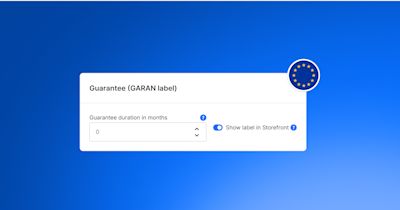
With Shopware 6.7.16.0, we’ve made further improvements to the GARAN label and legal guarantee functionality. You can now provide guarantee terms for each product as a PDF or via a link. Your customers can access these directly in the storefront and also open the full GARAN label. They can also access the guarantee terms in their order confirmation email – either through a link or as a PDF attachment.
Shopware now also saves the GARAN information when an order is placed. This preserves the original details, even if you change a product’s guarantee information later.
Another new option allows you to display the full legal guarantee notice directly below the terms and conditions at checkout. You can enable this in the cart settings, provided the general legal guarantee notice is already activated.
For more information about GARAN and the EU requirements, check out our blog post.
Transparent discount display based on the lowest price in the last 30 days
With the new release, we’ve adjusted how discounts are displayed in the storefront. If you’ve configured the lowest price in the last 30 days for a product, Shopware now calculates the percentage savings based on this price instead of the regular crossed-out price.
The display of crossed-out prices and discount badges also reflects this change. If the current selling price is not lower than the lowest price in the last 30 days, Shopware no longer displays a corresponding discount.
These changes help you present price reductions transparently and support compliance with the EU Price Indication Directive.
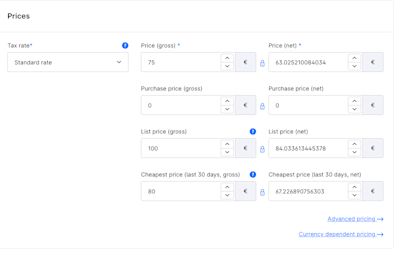
Price configuration in the Shopware administration showing the selling price, list price, and lowest price in the last 30 days.
More flexibility when selling digital products
You can now configure order quantities for digital products more flexibly. In the administration, you’ll find the new “Allow multiple units per order” option. When enabled, you can individually configure minimum order quantities, quantity increments, and maximum order quantities. If you turn it off, the order quantity is limited to one unit.
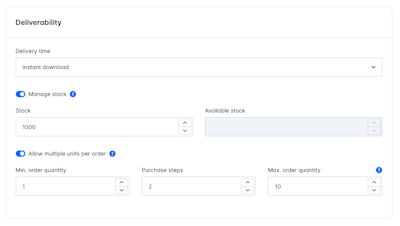
You can also save digital products without uploading files if you manage file assignments through an external solution. This gives you more flexibility in managing and selling digital products.
Further improvements in the administration
Shopware 6.7.16.0 also introduces several improvements to make everyday tasks in the administration easier:
Better overview of order details: For orders with more than ten line items, you can now navigate through the line item list using pagination and adjust the number of entries displayed per page. Colored status indicators also make it easier to identify the current order status at a glance.
Better organized plugin settings: Plugin developers can now organize configuration options into separate tabs, making it easier to navigate more complex plugin settings. This new layout is available for plugins whose developers choose to implement it.
Clearer guidance for SEO metadata: When editing products and categories, you can now see how many characters your meta titles and meta descriptions contain. Shopware also displays the recommended character length and highlights the notice if you exceed it.
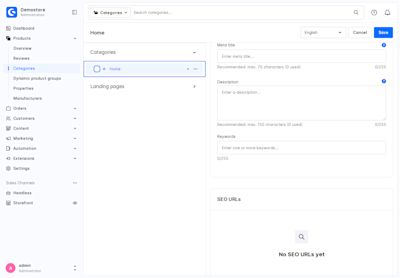
Shopware administration showing recommended character lengths for category SEO meta titles and descriptions.
These changes provide greater clarity across the administration and make managing settings and orders easier.
Fixes for Rule Builder conditions
We’ve fixed two issues in the Rule Builder that could affect how rules and promotions are applied.
Correct handling of cart line items: Rule Builder conditions now evaluate all matching cart line items again, regardless of whether they are regular products or, for example, custom line items. This ensures that rules for promotions and shipping methods work as intended.
More accurate discount rules: When evaluating the price-to-list-price ratio, Shopware now checks whether a list price is actually set. Products without a list price are no longer incorrectly treated as discounted.
These fixes help existing rules work more reliably and ensure that promotions are applied more accurately. Learn more about the Rule Builder.

Shopware 6.7.16.0 introduces new ways to extend Shopware, along with important changes to existing interfaces:
New extension events for the Store API: All core Store API routes now provide extension events. Developers can use
onPre(),onPost(), andonError()to modify inputs and results or handle errors without having to decorate the corresponding abstract routes.SEO URLs for app storefront routes: Apps can now define custom SEO URLs for storefront pages and entity routes through new manifest entries. The URLs are automatically updated when the associated entities change and can be customized per sales channel.
New administration APIs and composables (experimental): Selected APIs can now be imported directly through
shopware:*modules. In addition, the first composables are available to extensions as an alternative to existing administration mixins. Both features are still experimental and are expected to become stable with Shopware 6.8 and 6.9, respectively.MCP updates and stricter access permissions: MCP tool results now support structured data through
structuredContentand clearer error codes. In addition, integrations and non-administrator users can only access MCP capabilities that have been explicitly allowed. Existing permissions should therefore be reviewed.Preparing for Shopware 6.8: New feature flags allow developers to test upcoming changes to media URL paths, proportional cart tax calculations, and checkout behavior independently. The release also includes further deprecations and migration guidance for existing extensions.
For a complete overview of all technical changes and deprecations, check the Changelog.

This section is about features that are not included in the Community Edition. Take a look at our overview to compare the different Shopware plans and activate the Shopware Commercial extension to use the commercial features.
Nexus is now generally available, with a more flexible way to build and extend integrations
You can now develop connectors through configuration instead of custom code, making it easier to connect Shopware to systems your business already relies on.
This approach also lays the groundwork for partners and the community to contribute integrations.
Together with a growing catalog of more than 40 prebuilt connectors, this configuration-based approach to integration makes Nexus even more capable of connecting to a wider range of systems, while lowering integration effort and costs.
Learn more about Shopware Nexus.

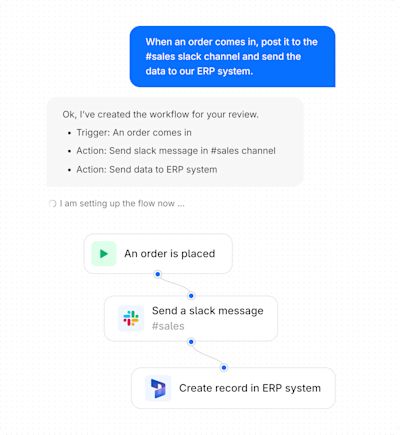
Build and manage your workflows smarter with Copilot in Nexus
Turning an automation idea into a working workflow can take time and specialist knowledge. With Copilot in Nexus, you can describe what you want to automate and get help building, refining, and debugging the workflow directly in Nexus.
This gives you a more intelligent way to create and improve automations, helping you move from an idea to working workflows with less manual effort.

In this section, we share updates from Shopware’s Agentic Commerce Lab as we explore and test how commerce will evolve for both humans and AI agents in the future. These experimental projects evolve independently from Shopware releases.
Bright Shelf: Create product visuals for your store
Creating high-quality product visuals and marketing content can take time and budget. Bright Shelf is a research preview that uses your store URL to gather details about your brand and tone of voice, then helps you create visuals based on that context.
Explore ideas for product images, lifestyle photos, ads, marketplace listings, social media posts, and short-form videos for TikTok or Instagram. Bright Shelf aims to make it easier and more affordable to produce the assets you need to promote products and reach customers. Try the research preview at Brightshelf: launch your products in minutes, not months.


We wish you lots of fun and success with the latest version of Shopware.

We extend our heartfelt thanks to all GitHub contributors for their pull requests that have been incorporated into this version. 💙