

With Shopware 6.7.14.0, we’re adding new capabilities for legal requirements, international shops, and day-to-day operations. These include the new EU notices, easier language management, more transparency around orders, and further improvements across the storefront and administration.
You’ll find all the details in the sections below.
Overview:

Ready for the new EU requirements: show the legal guarantee notice and the GARAN label directly in your shop
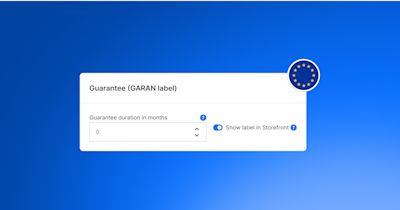
From September 27, 2026, new EU information requirements apply to selling physical goods to consumers. Shopware supports you with native functions for both labels, with no extra extension.
Turn the legal guarantee notice on under Settings > Cart settings > Checkout. The setting can be overridden per sales channel. The notice ships in all 24 official EU languages, matched to the storefront language, with English as the fallback
Maintain the GARAN label per product on the product detail page. It draws on the manufacturer and manufacturer product number and supports variant inheritance
Both labels also appear in the cart, on the order confirmation page, and in the order confirmation email
You remain responsible as the merchant for assessing whether and how the requirements apply to your assortment. Shopware provides the technical foundation and not legal advice.
You can also read more about this topic in our blog post.
Add and update community languages directly in the Administration
Managing additional languages in Shopware is now even easier. More than 40 translations maintained by the Shopware community can be added and kept up to date directly under Settings → Languages – without shell access, console commands, or an additional plugin.
Value & Opportunity
The new language management makes it easier to make your shop accessible to additional markets and audiences. Community translations can be added in just a few steps, while Shopware automatically keeps them up to date. At the same time, you remain in control: automatic updates can be disabled for individual languages, for example when translations have been customized.
Benefits
Add more than 40 community translations directly from the administration
See the current translation completeness before adding a language
Conveniently update individual, multiple, or all community languages
Keep translations current with automatic daily updates
SaaS instances are automatically updated monthly
Disable automatic updates for individually customized languages
Remove downloaded translation files when deleting a language
Use dedicated permissions to control which roles can manage translations
Manage additional languages without shell access, console commands, or an additional plugin
You can find the details in the Shopware documentation.
Track order status changes more clearly
With Shopware 6.7.14.0, the order status history provides more transparency. In the administration, you can now see more clearly what triggered a status change.
For example, when a customer changes the status through an action in the storefront, the change is shown as “Customer” in the status history instead of being attributed to the system. Changes made by an administrator in a sales channel context are also assigned to the respective user.
This makes status changes easier to trace and helps customer service and internal teams understand what happened more quickly.
Automatically notify customers about failed payments
The update introduces a new default flow for failed payment transactions, including a Flow Builder template and a matching email template.
This lets you automatically notify customers when a payment fails and handle the next steps through the Flow Builder. It reduces manual effort and helps keep communication consistent after failed payments.
More relevant results for multi-word searches
We improved the product search for multi-word queries. When customers search for several words, products now rank higher when the full phrase appears together in the product content.
This helps surface the most relevant matches higher in the search results while keeping the overall set of matching products unchanged. For shops using Elasticsearch, this results in more precise search ranking without additional configuration.

Shopware 6.7.14.0 also includes several technical changes that are relevant for developers:
More precise guidance on future API changes: Shopware now distinguishes more clearly between actual deprecations and planned changes to existing APIs. New BC-change attributes provide structured information about upcoming changes and whether they affect call sites or extensions. This reduces unnecessary deprecation warnings and helps developers prepare extensions for Shopware 6.8. You can find more background in our blog post.
Vue Single File Components for administration extensions: Administration components can now be implemented as
.vueSingle File Components. The new API is still experimental and is planned to become stable with Shopware 6.8.New ACL checks for Admin API endpoints: Numerous endpoints, including those for orders, media, SEO, and number ranges, now explicitly enforce the required privileges. Integrations with custom ACL roles should review their assigned permissions accordingly.
XML configuration will be removed with Shopware 6.8: Symfony XML configuration for services, routes, and packages is now deprecated. Plugin developers should migrate affected configuration to PHP or YAML in preparation for Shopware 6.8.
SEO URLs for headless sales channels: Headless sales channels can now generate their own SEO URLs for external storefronts and can also be used for product export feeds.
For a complete overview of all technical changes and deprecations, check the changelog.

This section is about features that are not included in the Community Edition. Take a look at our overview to compare the different Shopware plans and activate the Shopware Commercial extension to use the commercial features.
Configure organization access with greater precision
B2B Components now gives merchants more control over employee assignments and feature availability across their organizations.
New capabilities include:
Assign employees from other companies to an organization while defining their role
Add employees to an organization unit with a specific role in the same workflow
Global B2B feature toggle to enable or disable selected B2B Components feature sets, such as employee management and quick order, for newly registered Commercial customers by default.
Simplify organization setup, apply the right permissions from the start, and manage B2B functionality centrally without requiring individual customer configuration.
Learn more about B2B Components
Dive deeper with the Shopware documentation
Pay by invoice is here: offer your customers pay upon invoice through Shopware Payments

A new payment method is now available in Shopware Payments: pay upon invoice (PUI), processed by Ratepay. It covers the second-most-used online payment method in Germany, which accounted for around 26 percent of ecommerce revenue according to EHI and HDE data. Your customers order first and pay the invoice later, and you do not need a separate Ratepay integration.
How to turn it on:
If you use Shopware Payments as a service, the method was made available to you automatically
If you use Shopware Payments as an app on an older Shopware version, update the app once
Then assign the method to the sales channels where you want to offer it

In this section, we share updates from Shopware’s Agentic Commerce Lab as we explore and test how commerce will evolve for both humans and AI agents in the future. These experimental projects evolve independently from Shopware releases.
Agentic Readiness Scanner
How prepared is your shop for agentic commerce, and what should you improve first?
The new Agentic Readiness Scanner quickly assesses your store’s readiness and highlights practical opportunities to improve it.
Experience Studio
We’ve released a new version of Experience Studio, our research preview for creating memorable product landing pages.
The latest version includes a hero video section and lets you export your pages to Shopware for native integration with existing storefronts.
We’re looking for feedback from real merchants, partners, and ecommerce teams to help shape what comes next.


We wish you lots of fun and success with the latest version of Shopware.

We extend our heartfelt thanks to all GitHub contributors for their pull requests that have been incorporated into this version. 💙