Your business. Your demo. Ready in minutes.

Put Shopware to work for your business – in your free demo store with realistic workflows and selected extensions relevant to your industry. No commitment. No technical setup. Explore, evaluate, and build on your terms. Powered by Shopware Community Edition.

  • 30-day free trial

  • Seamless path to go-live

  • Built to scale

Home & Living
Fashion
Food & Beverages
Health & Beauty
Electronics
Sports
Kids & Toys
CE Discover Home

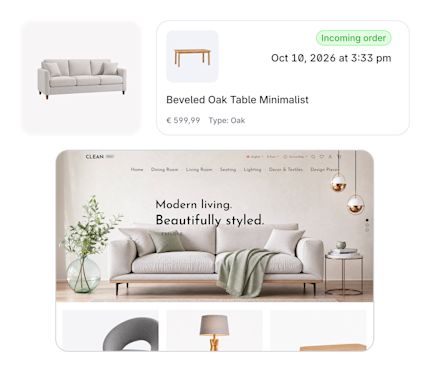
Shopping experiences that take ideas further.

Help customers navigate dimensions, materials, variants, and complete solutions – while connecting digital discovery with the places and expertise that bring decisions closer to purchase.

  • Guide customers through compatible options and product combinations.

  • Turn editorial content and design ideas into direct paths to purchase.

  • Connect every touchpoint, from online exploration to in-store experience.

Prefer a blank canvas?

No template. No assumptions. If your business doesn’t fit any of the industries above, start with the universal demo and shape it around your needs. Choose relevance when it helps. Choose freedom when you want it.

You are in good company
HOW TO GET STARTED

From first click to launch.

Choose your demo Select the industry that best reflects your business and explore it free for 30 days. Need more time? Simply apply for an extension.

Create your account Provide a few details and your demo is prepared automatically. No installation manuals to study. Just open your store and start exploring.

Build your way Step into a fully configured demo store tailored to your industry – ready to experience, adapt, and make your own.

Plan your go-live Choose the hosting provider and extensions that fit your business, see the costs upfront, and move from demo to launch with confidence.

YOUR COMMERCE FOUNDATION

Built to scale with your ambition.

Shopware Community Edition gives you a comprehensive open-source foundation for modern commerce – from products, content, and automation to international sales and operations. Start with powerful capabilities out of the box, then extend and adapt the platform as your business evolves.

Frequently asked questions

About your demo store
From demo to go-live
Support and security

Your demo is a fully functional test environment based on the open-source Shopware Community Edition – not a static mockup or guided product tour. Explore both the storefront and administration, work with realistic industry-specific products and content, and test selected commerce workflows and extensions. This hands-on experience allows you to evaluate how well Shopware meets the requirements of your business.

No. There’s no installation or technical setup required to get started. Your demo store is prepared automatically, so you can start exploring right away. If you decide to go live, we guide you through the transition from demo to production. The technical expertise you’ll need afterwards depends on how you choose to host and operate your live store – for example, a self-hosted setup requires you or your technical partner to manage the infrastructure and ongoing operation.

The demo is designed for safe evaluation, not live commerce. You can work with test customers and orders and explore the available checkout and payment workflows, but no real payments or commercial transactions are processed. This lets you experience the customer and operational journey without creating real orders or financial commitments.

The demo focuses on selected capabilities and workflows designed to help you evaluate Shopware in a realistic business context. Some sensitive, security-related, and system-level capabilities are only available in a live environment and are clearly identified as such. The demo is designed to give you a meaningful hands-on experience without exposing functionality that requires a production setup.

Your demo comes with no commitment to continue. If you decide not to go live, it expires at the end of the available demo period and the demo environment and its data are deleted in accordance with our data retention policies. There’s no software license fee or obligation to purchase a commercial Shopware plan.

The Shopware demo is designed for merchants evaluating the platform for a commercial business. Rather than being a temporary product sandbox, it gives you a realistic store environment to explore, build on, and potentially take forward to go-live.

That’s why we ask for valid company information when you create your demo. It ensures the experience is set up for a genuine business context and gives you a clear path forward if you decide to launch with Shopware.

Your demo is available free for 30 days. If you need more time to evaluate Shopware, you can request an extension of up to 60 days, subject to confirmation. If you decide to go live, you can start the process before your demo expires and take the store you’ve been working with into production – without starting over. If you choose not to continue, there’s no commitment: your demo expires at the end of the available period and is handled in accordance with our data retention policies.

Yes. If you decide to go live, you can take the store you’ve been working with into production – without starting over. You’ll first choose your hosting setup, review applicable costs and terms, and confirm the go-live steps. Once everything is in place, your demo store is transferred to its production environment and you can continue building from there.

No. You remain free to choose how you host and operate your store. Our recommended Shopware hosting partners provide a direct path to go-live, but you can also choose your own hosting or self-host Shopware. With a self-managed setup, you’re responsible for the technical implementation and operation of your production environment.

Shopware Community Edition remains open-source and free of software license fees when you go live. From there, you decide how to build your setup and which additional services you want to use – such as hosting, paid extensions, or professional services. Any applicable costs depend on the choices you make and are separate from the Community Edition software license. The Shopware Fair Usage Policy may also apply depending on your store’s annual GMV. Please review the policy and applicable terms before going live so you have a clear view of any potential costs.

Yes, and the choice remains yours. You can go live on Shopware Community Edition and continue building and operating your store without moving to a commercial plan. If you later need additional capabilities or direct Shopware support, you can explore our commercial plans and choose the option that matches your requirements. Our team can guide you through the available capabilities, costs, and next steps so you can make an informed decision.

Shopware Community Edition is the free, open-source foundation of Shopware, with no software license fee. It gives you the core capabilities to build, operate, and extend your store while keeping control over your hosting and technology setup.

Commercial Shopware plans build on this foundation with additional capabilities and direct in-house support from Shopware. Which option is right for you depends on your business requirements, operational complexity, and the level of support you need. For a detailed comparison of each plan and its capabilities, visit our pricing page.

You stay in control of what’s shared. Only with your explicit consent will Shopware share relevant company and contact information, along with your demo URL, with your selected hosting partner to support your go-live. Your payment information is never shared with the hosting partner.

We proactively monitor your demo for technical issues that prevent access to the storefront or administration. If we detect an availability issue, it is automatically routed to Shopware Support – you don’t need to open a support request yourself. This support focuses on keeping your demo technically accessible and does not include individual demo or go-live consulting.

For configuration questions, practical guidance, and exchanging ideas, you can turn to the Shopware community on Discord and in the Community Hub, including the Build & Launch Club. You'll also find important information and practical instructions in our documentation. If you need help with a partner extension included in your demo, you can request support from the respective extension partner directly through the demo overview in your Shopware account.

Shopware Community Edition is community-supported and does not include direct support from Shopware. You can connect with developers, merchants, and other Shopware users through the Community Hub – including the Build & Launch Club – and Discord to exchange knowledge, ask questions, and learn from the community. You'll also find important information and practical instructions in our documentation.

For professional implementation, configuration, or ongoing technical support, you can work with a Shopware agency partner. Direct in-house support from Shopware is available with our commercial plans: Shopware Rise, Evolve, and Beyond.

Your demo is designed as a protected environment for safely evaluating Shopware. Access and selected sensitive or system-level capabilities are restricted during the demo period. Once you go live, your security setup depends on the deployment model you choose. Secure hosting, regular updates, carefully selected extensions, and good operational practices all play a role in keeping your store protected. If you work with a hosting or implementation partner, they can also support you in establishing and maintaining the right security setup for your business.

The best way to evaluate a platform is to pressure-test it.

See how customer journeys and commerce operations come together on the open-source Shopware Community Edition. Free to explore. Clear from the start.

Copied to clipboard