


Find the Shopware plan
for your business
Build on an open-source platform with the tools and support to match your needs, from everyday selling to complex B2B commerce.
Community Edition
For businesses and developers building a store they can customize and grow.
Visual page builder
Product and order management
Shopware Payments¹
Community support

Adapt your store with access to the source code
Choose your hosting and implementation partners
Start with no platform license fee
Rise
For growing businesses ready for more tools and support.
First 30 days free
AI-assisted content creation
Product customization options
Returns management
Direct support from Shopware

Create and translate product content with AI
Let customers personalize products before buying
Manage customer returns directly in Shopware
Evolve
For businesses with advanced B2B or B2C requirements.
B2B components such as quotes and purchasing approvals
Advanced product search
Customer-group content targeting
Extended support with phone access

Support your B2B customers’ buying processes
Tailor products and content to customer groups
Help buyers find products with advanced search
Beyond
For businesses managing complex pricing and fulfillment.
Customer-specific pricing
Multi-location inventory
Digital Sales Rooms
24/7 priority support

Bring agreed customer prices into your store
Manage stock across multiple locations
Guide buyers through products in Digital Sales Rooms
Compare all plan features and products
Compare Plans
/month²
/month²
What counts as an execution?
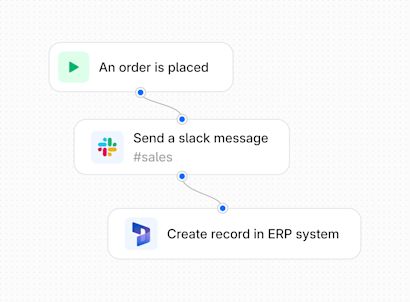
An execution is one workflow step (node) that completes successfully.
For example, if a single order or a batch of orders triggers a workflow with 4 steps and all 4 steps complete successfully, that counts as 4 executions.
Frequently asked questions
How can I sign up to Shopware Nexus?
If you already have an account, you can get started directly through your Shopware Admin in just a few steps.
Install the Nexus service in your Shopware Admin. Go to Settings → Services and activate the Shopware Nexus Event Ingestion Service.
Open the Nexus portal in your browser.
Review and accept the terms and conditions to complete your setup.
Once completed, your store is connected and ready to use Nexus!
How is Shopware Nexus billed?
Each shop you manage will receive a free monthly execution allowance based on its Shopware plan, with higher-tier plans including larger allowances. Once you exceed your monthly allowance, additional executions are charged in a block of 1,000 at €10 per block. Any additional usage is billed at the end of each month.
Do I need developer support to use Shopware Nexus?
Today, Shopware Nexus is primarily designed for developers and technical teams, so some technical knowledge may be helpful depending on your use case.
That said, we are continuously improving usability and expanding the interface to make Shopware Nexus more accessible for merchants and operational teams. Our goal is to enable businesses to manage and extend workflows independently, without relying heavily on developer support.
How will Shopware Nexus help early adopters stay competitive in the Shopware ecosystem?
Nexus helps you deliver projects faster by simplifying integrations and enabling reusable workflows across customers and use cases. Because workflows and connectors remain compatible across Shopware updates, teams spend less time on maintenance and ongoing technical work. This reduces project costs, improves efficiency, and creates more room to offer additional value-added services to customers. Nexus, and the data context of the system landscape it operates within, will allow you to recommend other systems that can help provide more value to your customers - for example, recommending complementary tools or making it easier to migrate from outdated proprietary systems, such as legacy PIM solutions.
Commerce that grows with you.
Flexible architecture designed for complex, global requirements.