


With Shopware 6.7.9.0, we’re releasing the minor update for April. This release introduces many new features, including the withdrawal button, a new Agentic Commerce sales channel, and chat history for Shopware Copilot.
You’ll find all updates and details in the sections below.
Overview:

Withdrawal button requirement: Now integrated in Shopware
Starting June 19, 2026, the so-called withdrawal button will become mandatory for many online merchants selling to Germany. With Shopware 6.7.9.0, we provide a built-in solution in the standard storefront to help you meet these legal requirements in time.
The implementation is based on an integrated online form that can be placed flexibly within the storefront using Shopping Experiences. Customers can submit their withdrawal request electronically and automatically receive a confirmation of receipt.
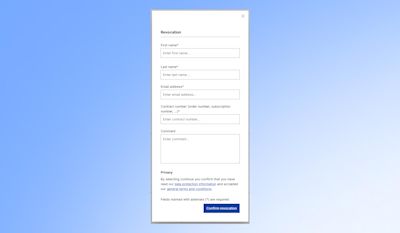
This ensures that the legally required process is fully covered on a system level - without the need for custom development.
For more details on the legal background and implementation, read our blog post.
More efficiency through automation: the new GMV collection
The improved GMV collection will be auto-installed on all Shopware shops that exceed version 6.7.8 and for CE customers who have accepted GTC v3.2+ and connected their shop to their Shopware Account.
Please read more in our blog post.
New chat history for Shopware Copilot
Shopware Copilot is an AI-powered assistant within the administration. It supports you with everyday tasks – for example by answering questions, analyzing data, or generating content.
We’ve now added a chat history to Copilot, allowing you to access your previous conversations directly within the interface. This helps you keep track of past requests, decisions, and next steps – without having to repeat prompts.
Chat history makes it easier to pick up existing context and work more efficiently with Copilot.
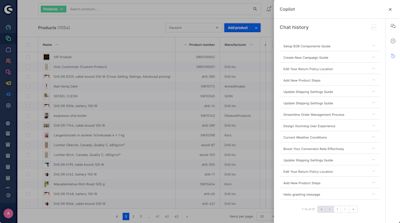
Learn more about Copilot here.
SEO improvements for better visibility
With Shopware 6.7.9.0, the foundation for modern structured data in the storefront has been improved.
Shopware now supports the JSON-LD format for structured data - the preferred standard for search engines. This allows content to be structured more clearly and processed more effectively by search engines. The feature is currently optional and can be enabled via a feature flag.
Your benefit: A stronger foundation for search visibility and a future-proof implementation of structured data.
CAD to 3D is now out of beta and additionally available via Shopware Intelligence+
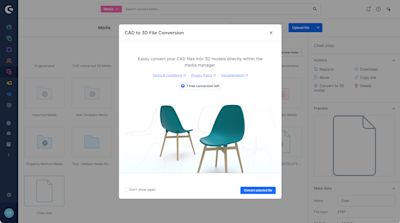
Stable version now available. Unlock spatial commerce by converting your existing CAD files into fast-loading, web-ready .glb models with just one click. Built natively into Shopware, you can use your converted models as product media, or explore 3D displays, AR viewers, immersive layouts, and scroll animations.
What used to be a production file is now a flexible storytelling asset, without new tools, workflows, or specialists.
The CAD to 3D conversion can be tested with 1 free conversion per month and purchased via the Shopware Intelligence+ subscription. If you’re using a commercial Shopware plan, the feature is already available to you with unlimited usage.
For more details on how it works and how to use it, see our Feature Focus blog post.
ZUGFeRD support for cancellations and credit notes
Shopware now also supports ZUGFeRD generation for cancellation documents and credit notes. Merchants can create compliant electronic documents for common post-order scenarios such as cancellations and credit notes directly within Shopware.
This is particularly relevant because, when using ZUGFeRD as an e-invoicing format, all related document types need to comply with the same standard and legal framework.
ZUGFeRD is based on the European e-invoicing standard EN 16931. In Germany, requirements for electronic invoicing are increasingly shifting toward standardized digital processing.
Originally, the Agentic Commerce Sales Channel and the ability to manage Open Graph data were planned for release with Shopware 6.7.9.0. However, these features are not part of this release.
We apologize for any confusion or incorrect expectations this may have caused. Both features will be included in the next minor release (6.7.10.0) in early May.

Shopware 6.7.9.0 also includes several improvements that are particularly relevant for developers:
New Storefront component system and global JavaScript event system as a foundation for future extensions
Improved admin search performance with optional OpenSearch integration
API enhancements and deprecations, including updates to newsletter routes and OpenAPI schemas
New options for configuring system values during staging setup
General stability and performance improvements across core and infrastructure
For a complete overview of all technical changes and details, check the Changelog.

This section covers services and features that are not included by default in the Community Edition. Take a look at our overview to compare the different Shopware plans and activate the Shopware Commercial extension to use the commercial features.
Shopware Nexus: Orchestrate workflows and integrations
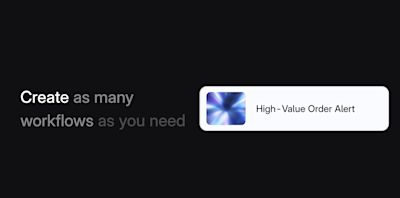
With Shopware Nexus, we introduce a new foundation for orchestrating workflows and integrations.
Nexus allows you to manage processes between Shopware and external systems such as ERP or CRM through a visual, event-driven layer. Instead of relying on custom scripts or additional middleware, integrations can be handled through a centralized workflow layer.
What this means in practice:
Build and extend workflows visually
Connect systems through event-driven processes
Standardize integrations instead of maintaining custom implementations
Reduce reliance on middleware and custom scripts
Nexus helps make integrations more stable and easier to evolve over time.
It was released this month and is now available as a Shopware Service (currently in beta). Learn more here.
Introduce Product Bundles (Blueprint)
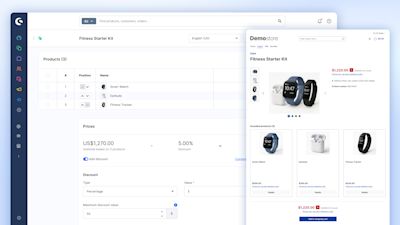
With Product Bundles (Blueprint), you can create curated sets of products directly in Shopware. Combine individual items into ready-to-buy bundles to boost sales and simplify the shopping experience.
As a first milestone, this blueprint focuses on core functionality and is designed to gather early feedback and requirements from you – helping us shape the next iterations of Product Bundles.
The next iterations will include adding options such as variants and quantity selection. You can follow the progress via the Shopware Roadmap.
The Product Bundles feature is available from the Shopware Evolve plan onwards.
→ Shopware Bundles documentation
New for Immersive Elements: Explosion Graphic Block
Immersive Elements is an app that allows you to present products in the storefront using interactive 3D and visualization elements.
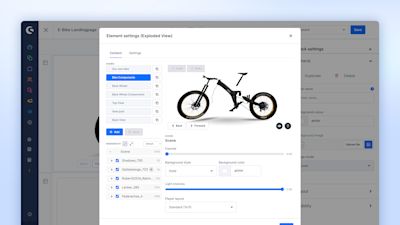
It has now been extended with an additional feature: the new Explosion Graphics Block. With it, you can create interactive exploded views of complex products – ideal for B2B use cases like machinery or spare parts management.
Break products into individual components, add annotations, and link directly to spare parts to help customers better understand and navigate complex setups.
Key features:
Interactive exploded views with step-by-step animations
Component structuring and annotations
Direct linking to spare parts
Optional autoplay and user interaction
This block can be purchased for additional €49 per month.

We wish you lots of fun and success with the latest version of Shopware.

We extend our heartfelt thanks to all GitHub contributors for their pull requests that have been incorporated into this version. 💙