

With Shopware 6.7.15.0, you can expect a comprehensive release with numerous updates. Highlights include the redesigned navigation and experimental dark mode in the administration, Copilot Agentic moving from beta to stable, and further improvements around the GARAN label and the new EU requirements.
You’ll find all the details in the sections below.
Overview:

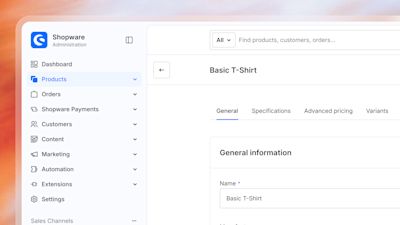
A clearer, more streamlined navigation in the administration
As the Shopware administration has grown over the years, so has the number of features and navigation items. What used to be a manageable list has become unmanageable. That is why we have redesigned the navigation, adapting it for our customers' increased requirements.
Here is what changes for you:
Improved density: Spacing, font sizes and grouping have been rebalanced. More fits on the screen without feeling cramped, and everything is easier to find.
Better active states: You can see at a glance which area you are currently in.
Clearer submenus: Submenus open and close with smooth animations, the menu can be collapsed, and on narrower screens it moves into an off-canvas view.
Better readability and keyboard accessibility: Better contrast, clearly visible focus states and consistent keyboard operation. If you work a lot with the keyboard, you'll be able to navigate much faster.
The page header, content area and side panels have been reworked in the same style, so everything feels consistent.
Administration dark mode
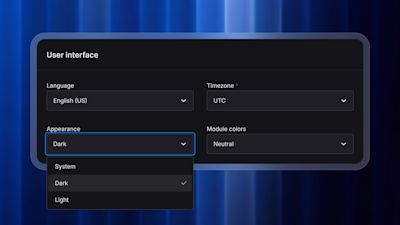
Many of you have asked for it, and now it's here: the administration offers a dark appearance for the user interface, for better accessibility and to match your personal preferences.
You can choose between light, dark and your system setting. With the system setting, the administration automatically follows whatever you have configured in your operating system. Your choice is saved for your user and applies throughout the administration. You can change it at any time in your profile settings.
Please note: the dark appearance is currently marked as an experimental feature. We are in the process of developing it further, so you may come across inconsistencies.
Further improvements for the GARAN label
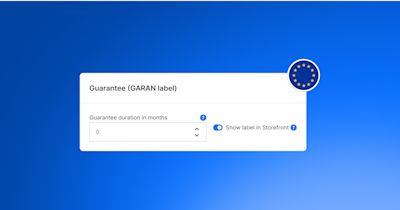
In the previous release, we introduced native support for the GARAN label and the EU legal guarantee notice. With Shopware 6.7.15.0, we’re refining the implementation further.
The GARAN label in the order confirmation email is now embedded as an inline PNG instead of an SVG data URI. This improves compatibility with email clients such as Gmail and Outlook. Its size and position have also been adjusted so that the label appears correctly next to the respective line item.
In addition, the guarantee duration you can maintain for a product is now limited to a maximum of 600 months, or 50 years. Existing values above this limit remain unchanged until the product is edited again.
These changes build on the GARAN and legal guarantee functionality introduced with the previous release and improve its handling across products and order confirmation emails.
You can also read more about this topic in our blog post.
Choose whether to send order confirmations for orders created in the administration
When you create an order directly in the administration, you can now choose whether your customer should automatically receive an order confirmation email.
In the final step of creating the order, you’ll find a new “Send order confirmation email to customer” option. It is enabled by default, so the existing behavior remains unchanged. If you turn it off, the order is created as usual, but no order confirmation email is sent.
This gives you more control over orders you create manually in the administration. Orders placed through the storefront are not affected by this change.
Manage multiple extensions at once
If you use many extensions in your shop, you can now manage them more efficiently. Under “My Extensions,” you can select multiple extensions and manage them together.
Depending on the status of the selected extensions, you can install, activate, deactivate, update, or uninstall them in bulk. The administration also shows you how many of the selected extensions each action applies to.
This means you no longer have to perform recurring actions for each extension individually, making it easier to maintain shops with a larger number of extensions.
Further storefront improvements
Several smaller changes also improve the user experience in the storefront:
Immediate feedback when adding products to the cart: When your customers add a product to their cart, the buy button now displays a loading indicator and is temporarily disabled. This makes it clear that the action is being processed and prevents the product from accidentally being added again with a second click.
Validate postal codes directly in the form: Shopware now uses the postal code patterns configured for each country for browser-side validation. Invalid entries are detected when the form is submitted, allowing your customers to correct them directly.
Clearer notices for promotion codes: If your customers enter an individual code for a promotion that has already been applied to the cart, they now receive a specific notice instead of a generic error message.
These changes provide clearer feedback at key points in the storefront and make interactions with your shop easier to understand.

Shopware 6.7.15.0 introduces several technical updates and new ways to extend Shopware:
New Document Generation v2 (experimental): The new, optional document generation introduces new API routes, business events, and extension points for plugins and apps. Plugins can register custom document types, data providers, and renderers, while apps can define their own document types through the manifest. The new implementation can be enabled using the
DOCUMENT_GENERATION_REWORKfeature flag.OAuth 2.0 with authorization code and PKCE: The Admin API now supports the authorization code grant with PKCE for registered public clients such as CLI tools and native applications. Users sign in through the administration and approve access there, so clients do not need to store the user's password or an integration secret.
More SEO support for headless sales channels: Sitemaps can now be generated for headless sales channels with an external storefront domain. In addition, Store API responses requested with
sw-include-seo-urlscan now include SEO URLs generated for headless sales channels.New extension points:
ProductListingCollectSortingEventallows extensions to register custom product listing sortings at runtime.JsonField::addPropertyMapping()lets plugins extend existing JSON schemas. Extensions can also contribute custom API CORS headers viaCorsHeaderProviderInterface.MCP updates: Toolsets can now be selected when connecting to the MCP server. Shopware has also moved both MCP servers to the declarative registration provided by the Symfony MCP bundle. Existing Shopware tags for tools, prompts, and resources remain unchanged, while integrations that rely directly on MCP internals may need to be adjusted.
For a complete overview of all technical changes and deprecations, check the Changelog.
Developer Experience: Shopware CLI updates
Alongside the changes in Shopware 6.7.15.0, the Developer Experience Tools team has introduced several updates to the the Shopware CLI over the past few months.
Most recently, a new ssh environment type makes it possible to use the CLI with Shopware installations that are not running locally. Commands such as project dump, project sql, project console, and project logs can now run against the selected remote environment.
Other recent additions include stable local domains for every Shopware project, an upgrade wizard to make upgrades more predictable, and a fully integrated, Docker-based development environment with an interactive terminal user interface (TUI).
Lots more to come through the rest of the year!

This section is about features that are not included in the Community Edition. Take a look at our overview to compare the different Shopware plans and activate the Shopware Commercial extension to use the commercial features.
Product Bundles: Flexible variant and quantity handling
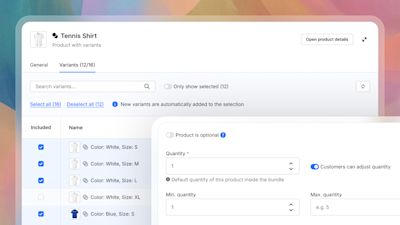
With Product Bundles, merchants can combine multiple products into attractive offers. From now on, variants and quantities can be handled even more flexibly: customers can select the right variant within a bundle and, where configured, adjust the quantity of individual bundle items.
This makes it easier to create more personalized offers, such as sets, starter kits, or curated product packages. Prices and selections are reflected directly during the purchase process, helping merchants manage bundles more efficiently while giving customers more flexibility.
With these improvements, we were also able to move Product Bundles from beta to stable. The feature is now available as a stable part of Shopware’s commercial features.
Copilot Agentic moves from beta to stable
Copilot can now support merchants across even more areas of their everyday work in Shopware. With Copilot Agentic moving to stable, support extends beyond Shopware’s core functionality to selected commercial features, including Advanced Search, B2B Budget Management, B2B Advanced Product Catalogs, Dynamic Access, Multi-Warehouse, Subscriptions, and Product Bundles.
Merchants can use natural language to retrieve information and perform actions across these features directly through Copilot, allowing them to delegate more everyday commerce tasks within Shopware. Further commercial features and enhancements will follow soon.
Copilot already checks a user’s permissions before preparing or executing an action. With this release, merchants can also assign Copilot to individual or custom ACL (access control list) groups and roles, helping ensure that Copilot operates within clearly defined boundaries.
The release also improves Copilot’s reliability, performance, scalability, and error handling. Together, these improvements provide a more reliable, scalable, and secure foundation for Copilot’s agentic capabilities.
Learn more about Copilot’s agentic capabilities in our documentation.
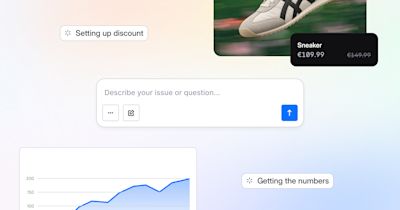
Extend Copilot with apps and plugins via MCP
Apps and plugins can now make their capabilities available to Copilot through MCP. For merchants, this means that more of the tools they already use can become accessible through one central Copilot experience – from retrieving information to taking action. This reduces the need to switch between different extensions and makes their functionality available directly within the conversation.
To make an extension available to Copilot, app and plugin developers need to integrate MCP and define the appropriate tools. Copilot can then discover these tools and use them when they are relevant to a merchant’s request. For partners, this provides a standardized way to make extension functionality accessible through Copilot.
Initial pilot implementations have been conducted with Nosto, The Boldest, and Impaqx.
Learn more about Copilot’s agentic capabilities and how extensions can integrate with Copilot in our documentation.
Shopware Analytics: Add custom metrics via Copilot
As of now, Shopware Analytics offers a limited set of foundational commerce metrics. With growing business complexity, the need for more extensive metrics raises while each business focuses on different aspects, leading to an never ending demand for all kinds of new metrics.
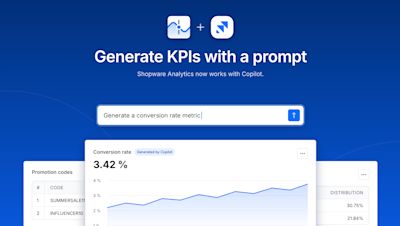
With Copilot Data Insights you can get the exact data you need. Ask Copilot a question about your shop data get the result in form of a chart or table.
With this, you can now save these as fixed metric to your Analytics dashboard. This helps you keep important numbers in one place and follow them over time, without asking the same question again.
Additionally you are now able to create own dashboards, to structure your metrics shaped to your business needs.
Optimized 3D files for better performance
3D content can make product experiences much more engaging, but large 3D files can also slow down storefront performance.
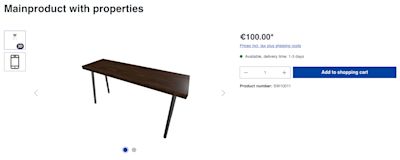
With the new 3D File optimization service, uploaded 3D files automatically get optimized so they are save to use in the storefront. File sizes are reduced while the visual quality remains for a great product presentation, helping pages load faster and deliver a smoother shopping experience.
We have now combined this service with the 3D Preview Generator. Together, they form a 3D pipeline that ensures smooth and reliable work with 3D data, from optimized files to ready-to-use previews in the storefront.

In this section, we share updates from Shopware’s Agentic Commerce Lab as we explore and test how commerce will evolve for both humans and AI agents in the future. These experimental projects evolve independently from Shopware releases.
New Shopping Assistant Starter Kit
The new Shopping Assistant Starter Kit gives merchants the essential building blocks to get started with their agent projects, including built-in tools, shop knowledge, guardrails, observability, merchant controls, daily insights, evaluations, and more
Autonomous Quotes Agent
Automate quote management and negotiation. The new Autonomous Quotes Agent can handle and negotiate quotes from both humans and other agents, while operating within merchant-defined policies and limits.
Claude Commerce Agents now work with Shopware
Our new reference implementation connects Claude’s Commerce Agents with a Shopware backend, released less than 48 hours after Claude Commerce Agents launched.

We wish you lots of fun and success with the latest version of Shopware.

We extend our heartfelt thanks to all GitHub contributors for their pull requests that have been incorporated into this version. 💙